Construction project controls, consulting, and In Project AI
How to Write a Construction Weekly Project Report (Template and Example)
A step-by-step guide to writing a one-page construction weekly report that owners actually read: the eight sections to include, a filled-in example, a section-by-section template, a weekly workflow, and how AI can draft it from your logs.
Article summary
A step-by-step guide to writing a one-page construction weekly report that owners actually read: the eight sections to include, a filled-in example, a section-by-section template, a weekly workflow, and how AI can draft it from your logs.
What a weekly report is for
A construction weekly report is a short management document that tells the owner and project leadership where the project stands, what changed since last week, and what decisions are needed. It is not a diary of everything that happened on site. The daily reports already do that.
The best weekly reports can be read in five minutes and leave the reader knowing three things: Is the project on track? What is the biggest problem? What do I need to do? If your report answers those questions on the first page, you are ahead of most projects.
An example one-page weekly report
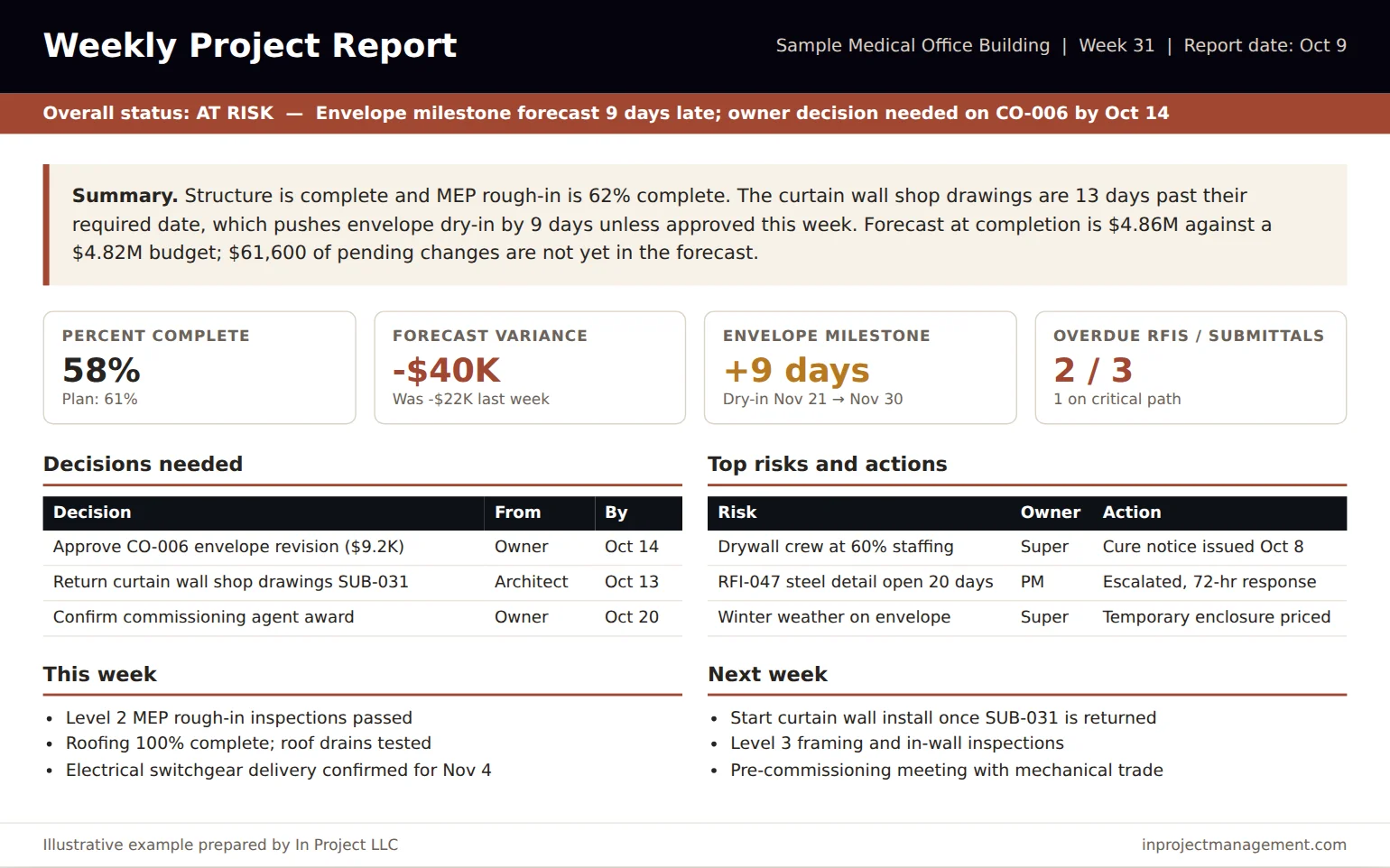
Before the template, here is what a good weekly report looks like. Notice that the status line and summary come first, every number shows movement from last week, and decisions have an owner and a date.
The 8 sections of a construction weekly report
| Section | What to include | Length |
|---|---|---|
| 1. Status line | Overall status (on track, at risk, off track) and the single reason | One sentence |
| 2. Summary | Progress, the biggest issue, cost and schedule position, what is needed | 3 to 4 sentences |
| 3. Key metrics | Percent complete vs. plan, forecast variance, key milestone variance, overdue items | 4 numbers with last week's value |
| 4. Schedule | Milestones with baseline and forecast dates; critical path changes; look-ahead concerns | Short table |
| 5. Cost and changes | Forecast at completion, change since last week, pending change exposure, contingency | Short table |
| 6. Risks and issues | Top three to five with owner and next action | Short table |
| 7. Decisions needed | What, from whom, and by when | Short table |
| 8. This week and next week | Major work completed and planned, inspections, deliveries | Two short lists |
How to write each section
1. Status line
Choose one status and give one reason. "At risk: envelope milestone forecast 9 days late pending shop drawing approval" is far more useful than "Overall the project is progressing well with some challenges." Define in writing what each status means. For example, at risk might mean any key milestone forecast more than 5 days late or forecast variance above 1% of the budget.
2. Summary
Write three or four plain sentences: where the work is, the biggest issue and its effect, the cost and schedule position, and what is needed from the reader. If an executive reads only this paragraph, they should still know what to do.
3. Key metrics
Pick four metrics and keep them the same every week so trends are obvious. Always show last week's value next to this week's. A forecast variance of -$40K means much more when the reader can see it was -$22K last week.
4. Schedule
List the next three to five milestones with baseline date, current forecast, and variance in days. Note any change to the critical path and the constraint causing it, such as a late RFI, a submittal, or a delivery.
5. Cost and changes
Report forecast at completion against the current budget, the change since last week, and pending change exposure as a separate number. Owners lose trust quickly when pending changes appear in the forecast without warning. For more on forecasting, see our construction cost control guide.
6. Risks and issues
Show only the top items from the risk register, each with an owner and the next action. A risk without an action is just a worry.
7. Decisions needed
This is the most important section for the owner. List each decision, who must make it, and the date it is needed to avoid impact. If a decision is late, say what it is costing in days or dollars.
8. This week and next week
Three to five bullets each: major activities, inspections, deliveries, and meetings. Keep it short; the detail belongs in the daily reports and look-ahead schedule.
Copy-ready weekly report template
- Project, week number, report date, prepared by.
- Overall status: On track / At risk / Off track. Reason: ___.
- Summary (3 to 4 sentences): Progress ___. Biggest issue ___ and its effect ___. Cost and schedule position ___. Needed from the reader ___.
- Key metrics: Percent complete (plan) ___ | Forecast variance (last week) ___ | Key milestone variance ___ | Overdue RFIs / submittals ___.
- Schedule: Milestone | Baseline | Forecast | Variance | Driver.
- Cost and changes: Current budget | Forecast at completion | Change since last week | Pending exposure | Contingency remaining.
- Top risks and issues: Item | Owner | Next action | Date.
- Decisions needed: Decision | From | Needed by | Impact if late.
- This week / next week: 3 to 5 bullets each.
A weekly workflow that keeps the report easy
| Day | Task | Owner |
|---|---|---|
| Monday | Update cost report, change log, and RFI and submittal logs | PM and project engineer |
| Tuesday | Update schedule progress and three-week look-ahead | Superintendent or scheduler |
| Tuesday | Review risk register and add new items | Project team |
| Wednesday | Draft and review the weekly report | Project manager |
| Wednesday or Thursday | Publish the report and walk through it in the owner meeting | Project manager |
If the logs are updated on time, the report takes 30 to 60 minutes. If the report takes half a day, the problem is usually that the logs were not updated during the week.
Tailoring the report to different readers
One weekly report rarely fits every audience perfectly. The trick is to keep one source report and adjust the emphasis, not to write three different documents.
| Reader | What they look for first | What to emphasize |
|---|---|---|
| Owner or owner's representative | Status, decisions needed, cost exposure | Decisions with dates; pending changes; milestone forecast |
| Contractor executive | Margin, risk, and client relationship | Forecast movement; top risks; staffing issues |
| Lender or program manager | Progress versus draw, schedule confidence | Percent complete versus plan; major milestones |
| Design team | Open RFIs, submittals, and design decisions | Aging items with required-by dates |
| Field team | What is coming next and what is blocked | Look-ahead, constraints, inspections, deliveries |
A simple approach is to keep the first page identical for everyone and attach the relevant log for each reader, such as the RFI log for the design team or the change log for the owner.
Weekly report versus monthly owner report
Many projects also produce a monthly report for the owner, lender, or board. The weekly report is tactical: it drives this week's actions and decisions. The monthly report is strategic: it explains the forecast, trends, contingency position, and the outlook to completion, and it often accompanies the pay application.
If the weekly reports are accurate and consistent, the monthly report becomes a summary of four weeks of data instead of a separate exercise. That is one of the strongest reasons to keep the weekly format stable.
Common weekly report mistakes
- Writing a long activity narrative instead of a status and decisions.
- Changing the metrics every week so trends are impossible to follow.
- Using red, yellow, and green without defined thresholds.
- Hiding pending changes until they are submitted for approval.
- Listing risks without owners or actions.
- Burying the decision the owner needs to make on page four.
Using AI to draft the weekly report
Much of the weekly report is assembling information that already exists: the cost report, change log, RFI and submittal logs, schedule update, and daily reports. AI tools can read those files, calculate movements, flag aging items, and draft the summary, metrics, risks, and decisions sections. In Project AI produces owner-ready reports this way from the documents you already export.
The project manager still reviews every number, corrects the narrative, and decides what to emphasize. Used this way, AI cuts drafting time and makes the report more consistent from week to week, without taking judgment out of the process. For why the weekly rhythm matters so much, see why weekly project reporting is critical.
Frequently asked questions
What should be included in a construction weekly report?
An overall status with a reason, a short summary, four key metrics with last week's values, schedule milestones, cost and pending changes, top risks and issues, decisions needed with owners and dates, and a short list of this week's and next week's work.
How long should a construction weekly report be?
One page for the main report is ideal, with supporting logs attached if needed. Owners and executives should be able to understand the project's status in about five minutes.
Who prepares the weekly report on a construction project?
Usually the project manager, using inputs from the superintendent, project engineer, scheduler, and accounting. On larger projects a project controls team may prepare it for the PM's review.
What is the difference between a daily report and a weekly report?
A daily report records what happened on site each day: labor, equipment, work performed, weather, deliveries, and incidents. A weekly report summarizes status, trends, risks, and decisions for the owner and leadership.
Can AI write a construction weekly report?
AI can draft much of it from your cost report, logs, schedule update, and daily reports, but the project manager must review and correct it before it goes to the owner.