Construction project controls, consulting, and In Project AI
Three-Week Look-Ahead Schedule: Template, Example, and Best Practices
How to build and run a three-week look-ahead schedule on a construction project: what it is, how it connects to the master schedule, a filled-in example, the columns to include, constraint analysis, the weekly meeting, percent plan complete, and common mistakes.
Article summary
How to build and run a three-week look-ahead schedule on a construction project: what it is, how it connects to the master schedule, a filled-in example, the columns to include, constraint analysis, the weekly meeting, percent plan complete, and common mistakes.
What is a three-week look-ahead schedule?
A three-week look-ahead is a short-range schedule that breaks the next three weeks of the master schedule into the specific tasks crews will perform, who will perform them, and what must be in place before they can start. It is the bridge between the long-range CPM schedule in Primavera P6 or Microsoft Project and the daily work in the field.
The master schedule tells you what should happen this quarter. The look-ahead tells the superintendent and trade foremen what will actually happen next week, and which constraints must be cleared so it can.
Why look-ahead schedules matter
- They surface constraints early. Late RFIs, unapproved submittals, missing materials, inspections, and short crews become visible two to three weeks before they stop work.
- They make the master schedule realistic. Field crews plan in days and areas, not in month-long summary activities.
- They create commitments. Trades commit to specific work, which improves reliability and accountability.
- They feed better updates. Actual progress against the look-ahead makes the monthly schedule update more accurate.
An example look-ahead
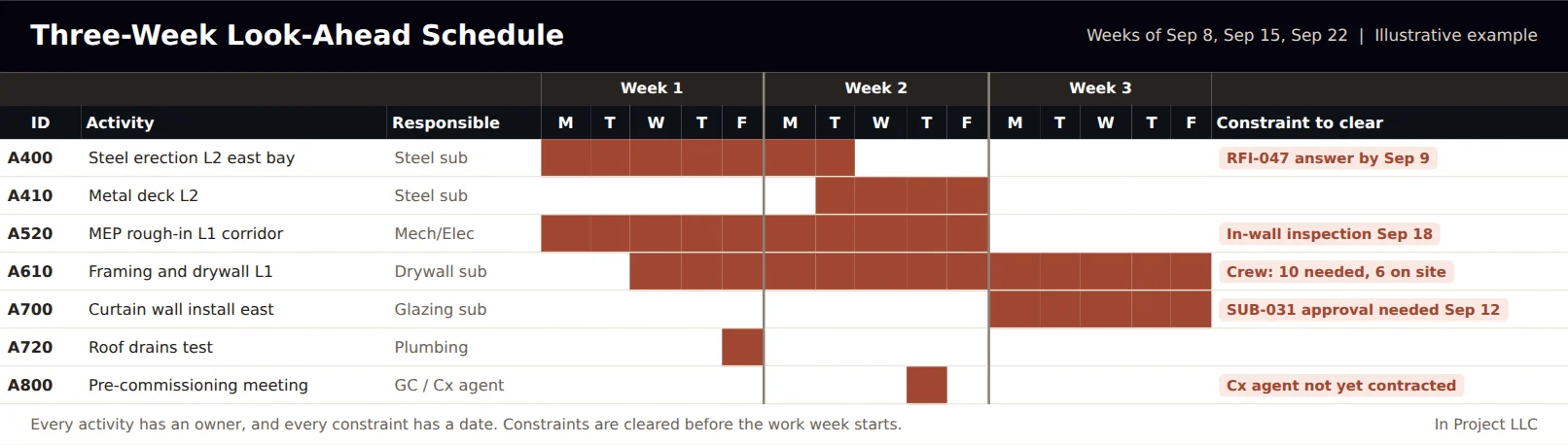
Notice the right-hand column. The value of a look-ahead is not the bars; it is the list of constraints with dates. In this example the steel crew needs an RFI answer before reaching grid C-4, the drywall crew is short four workers, and the curtain wall cannot start without an approved submittal.
What to include: look-ahead template columns
| Column | What to enter |
|---|---|
| Activity ID | Matching the master schedule activity, so progress rolls up |
| Task description | Specific work and location, such as "Frame and board L1 corridor, grids 1 to 4" |
| Responsible trade and foreman | Who commits to the work |
| Daily plan for weeks 1 to 3 | Days the task will be worked |
| Crew size planned | Number of workers needed |
| Constraints | RFIs, submittals, materials, equipment, inspections, predecessor work, permits, access |
| Constraint owner and due date | Who clears it and by when |
| Status | Ready, constrained, in progress, complete |
How to build a three-week look-ahead
- Start from the master schedule. Filter activities starting or in progress in the next three weeks, plus anything on the critical or near-critical path.
- Break activities into tasks. Split summary activities into area-based tasks a crew can finish in days, not weeks.
- Assign each task to a trade and foreman. Confirm with the trade, not just in the office.
- Screen every task for constraints. Ask: Are drawings and RFIs resolved? Are submittals approved? Is material on site or confirmed? Is equipment available? Is the predecessor work done? Are inspections scheduled? Is the crew available?
- Assign each constraint an owner and a date. The date must be before the task's planned start.
- Publish and review weekly. Roll the look-ahead forward every week, dropping the completed week and adding a new third week.
Constraint analysis: the heart of the look-ahead
| Constraint | Typical owner |
|---|---|
| Open RFI or unclear design | Project engineer, with the design team |
| Submittal not approved | Project engineer and trade, with the architect |
| Material not delivered | Trade and purchasing |
| Equipment or crane availability | Superintendent |
| Predecessor work incomplete | Superintendent and preceding trade |
| Inspection not scheduled or failed | Superintendent and trade |
| Crew size below plan | Trade foreman and project manager |
| Owner decision pending | Project manager with the owner |
A task should be released to the weekly work plan only when all of its constraints are cleared. Releasing constrained work is the fastest way to waste crew time and lose trust in the plan.
Running the weekly look-ahead meeting
- Review last week. Which committed tasks were completed? For each missed task, record the reason.
- Walk the next three weeks. Trade by trade, confirm tasks, dates, crews, and constraints.
- Assign and confirm constraint owners. Every open constraint leaves the meeting with a name and a date.
- Commit next week's work. Trades commit only to tasks that are ready.
- Escalate. Constraints the team cannot clear go to the project manager and owner, usually through the weekly report.
Keep the meeting to about an hour, standing at the plan if possible. The superintendent usually leads it, with the project engineer tracking constraints.
Measure reliability with percent plan complete
Percent plan complete (PPC) is a simple measure from the Last Planner System developed by the Lean Construction Institute. It is the number of tasks completed as committed divided by the number of tasks committed for the week. A project that consistently completes most of what it commits can be planned with confidence; a project with low PPC has a planning or constraint problem.
| Week | Tasks committed | Completed as planned | PPC | Top reason for misses |
|---|---|---|---|---|
| Week 30 | 24 | 17 | 71% | Drywall crew short |
| Week 31 | 22 | 17 | 77% | Submittal SUB-031 late |
| Week 32 | 25 | 21 | 84% | Inspection rescheduled |
Track the reasons for missed tasks. Over a few weeks they show where the real problems are: design questions, submittals, labor, materials, or predecessor work.
Choosing the right horizon
Three weeks is the most common window, but the right horizon depends on lead times. If most constraints are RFIs and inspections, three weeks is usually enough. If the critical constraints are long-lead materials, prefabricated assemblies, or complex permits, a four- to six-week look-ahead gives enough time to act.
| Project situation | Suggested horizon |
|---|---|
| Interior fit-out with short lead times | 2 to 3 weeks |
| Typical commercial building | 3 weeks |
| Heavy prefabrication or long-lead equipment | 4 to 6 weeks |
| Complex sequencing in occupied buildings | 3 to 4 weeks plus a daily phasing plan |
Tools for look-ahead scheduling
Many teams start with a spreadsheet or a printed plan on the trailer wall, and that is often enough. Scheduling software such as Primavera P6 or Microsoft Project can filter and export the look-ahead window directly, and many project management platforms include look-ahead or short-interval planning features. Pull-planning boards with sticky notes remain popular for collaborative planning with the trades. The tool matters less than the habits: task-level detail, constraint screening, trade commitment, and weekly measurement.
Common look-ahead mistakes
- Copying the master schedule into a three-week window without breaking down tasks.
- Building the look-ahead in the office without the trades.
- Listing tasks with no constraint screening.
- Releasing work that is not ready because the master schedule says it should start.
- Never measuring whether committed work was completed.
- Letting the look-ahead drift away from the master schedule so updates no longer match.
Look-ahead vs. master schedule vs. daily plan
| Level | Horizon | Detail | Owner |
|---|---|---|---|
| Master (CPM) schedule | Whole project | Activities, logic, critical path | Scheduler and project manager |
| Look-ahead | 3 to 6 weeks | Tasks, crews, constraints | Superintendent |
| Weekly work plan and daily huddle | 1 week and 1 day | Committed tasks and daily assignments | Foremen |
How the look-ahead improves cost and owner reporting
A well-run look-ahead does more than keep crews productive. It improves the whole controls system:
- Better forecasts. Recurring constraints such as a short-staffed trade show up early enough to price recovery or acceleration before it becomes a change order.
- Earlier owner decisions. Constraints that need an owner decision appear in the weekly report while there is still float to protect.
- Stronger records. Weekly commitments and reasons for misses document delays and their causes, which supports fair resolution of time extension requests.
- More accurate schedule updates. Progress measured against the look-ahead makes the monthly update a confirmation instead of a guess.
In short, the look-ahead turns the master schedule from a contract document into a working tool, and it gives the project manager early warning that feeds cost, risk, and owner reporting.
Using AI with look-ahead schedules
AI tools can help by reading the master schedule, RFI and submittal logs, delivery information, and daily reports, and flagging look-ahead tasks that are likely to be constrained. They can also summarize why committed work was missed. In Project AI analyzes schedule updates alongside RFIs, submittals, and field reports to surface constraints and slipping milestones for the team to review. For the RFI side, see RFI best practices.
How In Project helps
In Project LLC helps project teams connect master schedules, look-aheads, and document control so constraints are cleared before they become delays. Contact us about schedule and project controls support.
Frequently asked questions
What is a three-week look-ahead schedule?
A short-range construction schedule that breaks the next three weeks of the master schedule into specific tasks with responsible trades, daily plans, crew sizes, and the constraints that must be cleared before work can start.
Who prepares the look-ahead schedule?
Usually the superintendent, with input from trade foremen and the project engineer, reviewed weekly in a look-ahead or coordination meeting.
How often should a look-ahead schedule be updated?
Weekly. Each week the completed week drops off, a new third week is added, and constraints and commitments are reviewed.
What is percent plan complete?
Percent plan complete (PPC) is the share of committed weekly tasks completed as planned. It comes from the Last Planner System and measures how reliable the short-term plan is.
What is the difference between a look-ahead and the master schedule?
The master schedule covers the whole project with logic and the critical path. The look-ahead covers the next few weeks in task-level detail, with crews and constraints, so the field can execute the master plan.