Construction project controls, consulting, and In Project AI
AI for Construction Project Managers: 10 Practical Workflows (With Prompts)
Ten practical ways construction project managers can use AI today, from RFI triage and change order review to weekly reports and risk registers, with example prompts, what to feed the AI, what to check, and the guardrails that keep it safe.
Article summary
Ten practical ways construction project managers can use AI today, from RFI triage and change order review to weekly reports and risk registers, with example prompts, what to feed the AI, what to check, and the guardrails that keep it safe.
Where AI actually helps a construction PM
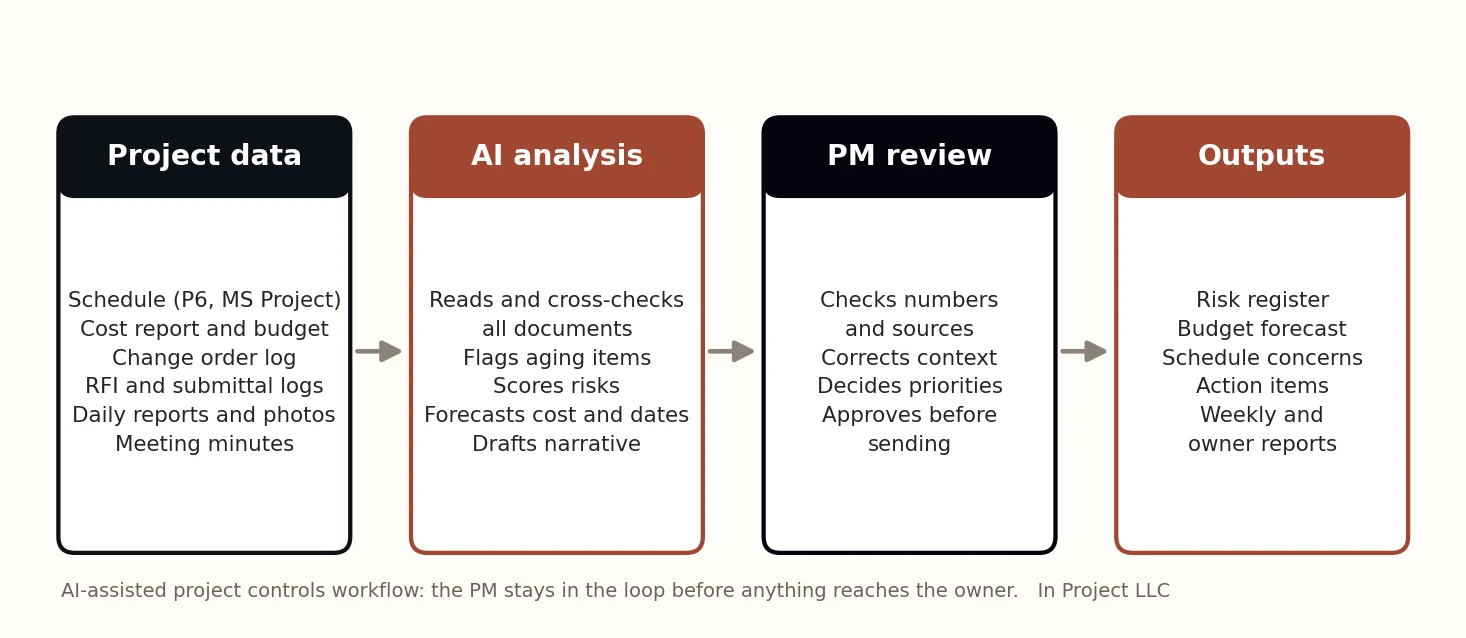
Most of a construction project manager's week is spent reading, reconciling, and summarizing: RFI logs, submittal registers, cost reports, change logs, schedules, daily reports, and meeting notes. That is exactly the kind of work current AI tools do well. They read large volumes of text quickly, cross-check documents, and draft structured summaries.
What AI does not do well is know your contract, your owner, your site conditions, or the conversation you had with the superintendent this morning. The winning pattern is simple: let AI do the reading and first draft, and keep the project manager responsible for judgment and final decisions.
Before you start: four guardrails
- Protect confidential data. Use an approved, business-grade tool. Do not paste contracts, bids, or personal information into consumer chat tools that may retain data. Check your company and owner policies.
- Give it the source documents. AI is far more accurate when it summarizes files you provide than when it answers from general knowledge.
- Ask for sources and assumptions. Request that every number or claim reference the log line, page, or date it came from.
- Review before you send. Treat AI output as a draft from a capable assistant who has never been on your site.
1. RFI log triage
Feed it: your RFI log export with dates, status, responsible party, and the look-ahead schedule.
Prompt: Review this RFI log and three-week look-ahead. List open RFIs older than 10 days, the activity each one affects, and whether that activity is on or near the critical path. Rank them by schedule risk and suggest who should be contacted. Cite the RFI number for every item.
Check: the critical-path calls against your own schedule, and whether any RFI was answered informally but not closed in the log.
2. Submittal register review
Feed it: the submittal register and procurement lead times.
Prompt: Compare each submittal's current status and required date with the material lead time. Identify submittals that will cause a delivery past the need date if not approved within 7 days. Show the math for each.
3. Change order review
Feed it: the change order request, the relevant specification section or drawing note, and the subcontractor's pricing backup.
Prompt: Summarize this change order request. Identify the claimed cause, whether the scope appears to be in the base contract based on the attached specification, the cost breakdown by labor, material, equipment, and markup, and any items that look duplicated or unsupported. List questions I should ask before recommending approval.
Check: contract language and entitlement. AI can spot inconsistencies; it cannot decide entitlement.
4. Schedule update narrative
Feed it: this period's and last period's schedule exports or reports.
Prompt: Compare these two schedule updates. List milestones that moved, by how many days, and the activities driving the change. Identify activities whose total float dropped by more than 5 days. Draft a one-paragraph schedule narrative for the owner.
Check: whether logic changes or progress errors, rather than real delays, caused the movement. A schedule comparison is only as good as the updates behind it.
5. Risk register first draft
Feed it: daily reports, meeting minutes, the RFI and change logs, and the current risk register.
Prompt: From these documents, identify new risks not already in the attached risk register. For each, write a cause-event-effect description, a suggested 1 to 5 likelihood and impact score, a likely owner, and a specific mitigation. Reference the source document and date.
Check: scores against your own impact scale. See our risk register guide for a scoring matrix.
6. Cost report variance explanation
Prompt: Using this cost report, list cost codes where the forecast at completion moved by more than $10,000 since last month. For each, explain the likely driver using the change log and commitments, and flag any line where the estimate to complete equals budget minus actual.
Check: the drivers against what you know from buyout and the field. AI will find the movement; you supply the reason the owner needs to hear.
7. Daily report summary
Prompt: Summarize these 5 daily reports into a weekly field summary: crew counts by trade versus plan, work completed by area, weather impacts, deliveries, inspections, safety observations, and any issues that need follow-up.
Check: crew counts against the look-ahead plan. A trade consistently below plan is often the earliest warning of a schedule problem.
8. Meeting minutes and action items
Prompt: Turn these meeting notes into minutes with a numbered action list. Each action needs an owner, a due date, and the decision or issue it relates to. Flag any action from last week's list that was not mentioned.
Check: owners and dates. AI often assigns an action to whoever spoke about it, not to the person who actually owns it.
9. Weekly owner report draft
Combine the outputs above into the weekly report: status, summary, metrics, schedule, cost and pending changes, risks, decisions needed, and next week. Our weekly report guide has the section template to give the AI.
Check: that the status, the summary, and the decisions-needed list tell the same story, and that pending changes are shown separately from the approved forecast.
10. Action list with cost impact
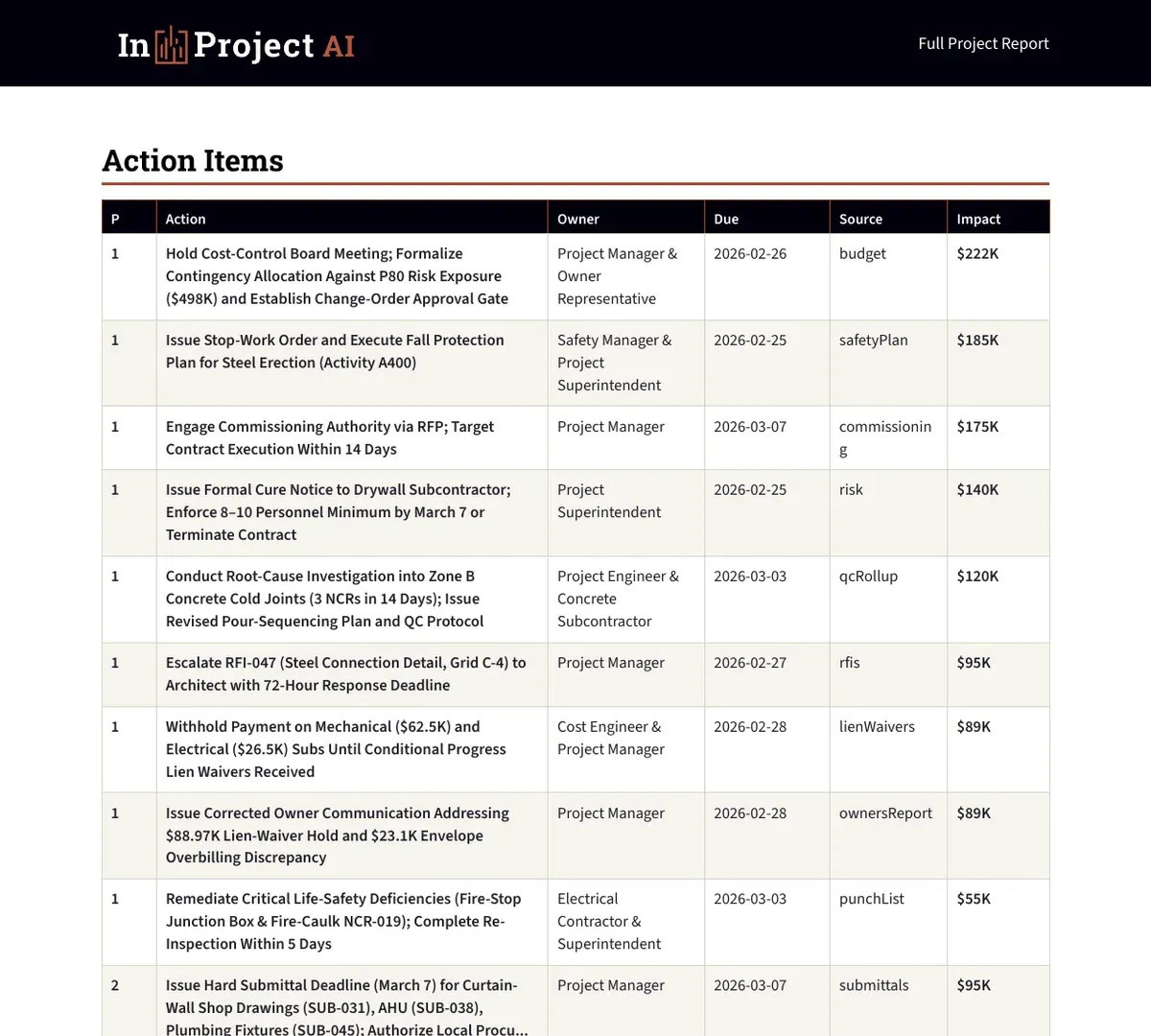
The most valuable output is often a prioritized action list: what needs to happen, who owns it, by when, and what it is worth if it slips.
Getting started in one week
| Day | Step |
|---|---|
| Day 1 | Pick one active project and one workflow, such as RFI triage or the weekly report |
| Day 2 | Export clean source files: RFI log, look-ahead, cost report, or daily reports |
| Day 3 | Run the prompt or tool and compare the output with what you already know |
| Day 4 | Refine the prompt or inputs; note what the AI missed or got wrong |
| Day 5 | Use the reviewed output in a real meeting or report and record the time saved |
Measure two things during the pilot: hours saved on reading and drafting, and issues caught earlier than they would have been otherwise. If both move in the right direction, expand to a second workflow. If not, the problem is usually the input data, not the tool.
What good AI output looks like
- Every finding cites the log line, document, or date it came from.
- Numbers reconcile with your cost report and schedule.
- Assumptions are stated, not hidden.
- Items are ranked by impact, not listed in the order they appeared.
- Each action has an owner and a due date.
Chat tools versus purpose-built construction AI
| Approach | Strengths | Limitations |
|---|---|---|
| General chat assistants | Flexible, fast for one-off documents and drafting | Manual copy and paste; you build the prompts; data policies vary by plan |
| AI inside your PM platform | Works on data already in the system | Limited to that platform's data and features |
| Purpose-built project controls AI | Reads many document types together; produces standard reports and registers | Needs clean exports; still requires professional review |
In Project AI is an example of the third approach: you upload the schedules, budgets, logs, pay applications, and daily reports you already have, and it produces a risk register, budget forecast, schedule concerns, action items, and owner-ready PDF and Excel outputs for your review.
Mistakes to avoid
- Asking AI questions about your project without giving it your project documents.
- Sending AI-written content to an owner without checking every number.
- Pasting confidential contracts or bids into tools that are not approved for that data.
- Using AI to decide entitlement, safety, or contractual positions.
- Expecting AI to fix messy logs. Clean inputs produce useful outputs.
How In Project helps
In Project LLC combines project controls consulting with practical AI. We help teams standardize their logs and reports so AI has good inputs, and In Project AI turns those inputs into reviewable outputs. For a broader look at agents, see how AI agents can help project managers, or contact us.
Frequently asked questions
How can construction project managers use AI?
The most practical uses today are triaging RFI and submittal logs, reviewing change order requests, comparing schedule updates, drafting risk registers, explaining cost variances, summarizing daily reports and meetings, and drafting weekly owner reports, always with PM review.
Is it safe to use ChatGPT or other AI tools with construction documents?
Only if the tool and plan are approved for your data. Use business-grade tools with clear data retention terms, follow company and owner policies, and avoid pasting confidential contracts, bids, or personal information into consumer tools.
Will AI replace construction project managers?
No. AI reduces the time spent reading and drafting, but contracts, relationships, safety, entitlement, and final decisions require experienced, accountable professionals.
What is the best AI prompt for construction project management?
Good prompts give the AI the source documents, ask for a specific structured output, set thresholds such as RFIs older than 10 days, and require it to cite the log line or document date for every finding.