Construction project controls, consulting, and In Project AI
Construction Technology Trends 2026: What Project Managers Should Act On
The construction technology trends that matter for project managers in 2026: AI and agents, connected project data, BIM and digital twins, reality capture, field and safety tech, and offsite construction. What each one changes for cost, schedule, and risk control, with adoption data and a practical roadmap.
Article summary
The construction technology trends that matter for project managers in 2026: AI and agents, connected project data, BIM and digital twins, reality capture, field and safety tech, and offsite construction. What each one changes for cost, schedule, and risk control, with adoption data and a practical roadmap.
The big picture for 2026
Construction technology has moved from pilots to everyday tools on many projects, but adoption is uneven. Some firms now use AI daily, while many are still experimenting. For project managers, the question is not which technology is most exciting. It is which tools improve cost, schedule, risk, and communication on the projects they run this year.
| Finding | Source |
|---|---|
| About 45% of construction organizations reported no AI implementation and 34% were in early pilots; just under 12% used AI regularly in specific processes | RICS, Artificial Intelligence in Construction, September 2025 (2,200+ global respondents) |
| 52% of U.S. construction and design businesses use AI-powered tools for business tasks, up 20 points from the prior year; users save an average of 4.7 hours per week | Houzz State of AI survey, 2026 (601 businesses) |
| 47% of contractors with openings for AI specialists reported difficulty filling them, up from 30% the year before | AGC 2025 Workforce Survey |
The pattern is clear: interest and use are rising quickly, but mature, organization-wide adoption is still rare. That gap is an opportunity for teams that adopt deliberately.
1. AI moves from chat to project workflows and agents
The biggest shift is AI moving from a general chat window into specific project workflows: estimating and proposals, RFI and submittal review, schedule analysis, risk registers, cost forecasting, and owner reporting. The next step is AI agents that read many documents, carry out multi-step analysis, and hand back a finished draft for review. We explain the difference in AI agents in construction project management.
What it changes for PMs: less time compiling, more time deciding. Watch out for: data privacy, accuracy, and treating drafts as final. Start with the practical workflows in our AI workflows guide.
2. Connected project data and integrations
Most firms run accounting, scheduling, document management, and field apps that do not talk to each other well. In 2026 the focus is shifting from buying more tools to connecting the ones already in place through integrations, common data environments, and open standards such as the Model Context Protocol that let AI agents access project systems directly.
What it changes for PMs: less re-keying, faster reports, and one version of the truth. Watch out for: integration projects that never finish. Connect the data behind your most important report first. See data-driven construction project management.
3. BIM and digital twins beyond coordination
Building Information Modeling is standard for coordination and clash detection on larger projects. The trend is using the model for more of the project lifecycle: quantity takeoff, sequencing (4D), cost linking (5D), field layout, and turnover to facilities teams as a digital twin connected to operating data.
What it changes for PMs: better constructability review and fewer field conflicts. Watch out for: models that are not maintained after design, so the field stops trusting them.
4. Reality capture and progress tracking
360-degree photo capture, laser scanning, and drones are now common ways to document progress and compare installed work with the model. Some platforms use computer vision to estimate progress automatically.
What it changes for PMs: objective progress records that support pay applications, schedule updates, and dispute avoidance. Watch out for: capturing data nobody reviews. Tie capture to a specific use, such as monthly progress verification or pre-cover inspections.
5. Field, safety, and wearable technology
Mobile field apps for daily reports, inspections, and punch lists are now standard. Newer safety technology includes wearables, proximity sensors, and AI review of site photos for hazards.
What it changes for PMs: faster, more complete daily data and earlier safety warnings. Watch out for: privacy expectations and alert fatigue. Agree on what data is collected and how it is used before rollout.
6. Offsite construction and prefabrication
Prefabricated MEP racks, bathroom pods, panelized wall systems, and modular units continue to grow, driven by labor shortages and schedule pressure. They shift risk from the field to the factory and make early design decisions and procurement more critical.
What it changes for PMs: shorter field durations but earlier and stricter submittal and approval deadlines. Watch out for: late design changes that the factory schedule cannot absorb.
7. Workforce and skills technology
With experienced project managers and superintendents in short supply, firms are using technology to make each person more effective: standardized digital templates, AI-assisted reporting, training platforms, and knowledge bases built from past projects. We cover the workforce picture in the project management talent gap.
Technology at a glance: impact on project controls
| Trend | Cost control | Schedule control | Risk control |
|---|---|---|---|
| AI workflows and agents | Faster variance analysis and forecast drafts | Automated schedule comparisons and constraint flags | Draft risk registers from daily reports and logs |
| Connected data | Fewer re-keying errors in cost reports | Current progress feeds the schedule | One source of truth for issues |
| BIM and digital twins | Model-based quantities and estimates | 4D sequencing and logistics planning | Clash detection before fabrication |
| Reality capture | Verified progress for pay applications | Objective percent complete | Documented conditions for disputes |
| Field and safety tech | Accurate labor and equipment data | Daily progress against the look-ahead | Earlier hazard detection |
| Offsite construction | More price certainty earlier | Shorter field duration | Risk shifts to design and procurement timing |
Questions to ask any technology vendor
- Which specific problem on our projects does this solve, and how will we measure it?
- What data does it need, and can it read the exports we already have?
- Where is our data stored, how long is it kept, and is it used to train models?
- How long does a typical team take to become productive with it?
- Can we run a pilot on one project before committing?
- What happens to our data and reports if we stop using the product?
How to prioritize: a simple scoring method
| Question | Why it matters |
|---|---|
| Does it solve a problem we have on current projects? | Technology without a problem becomes shelfware |
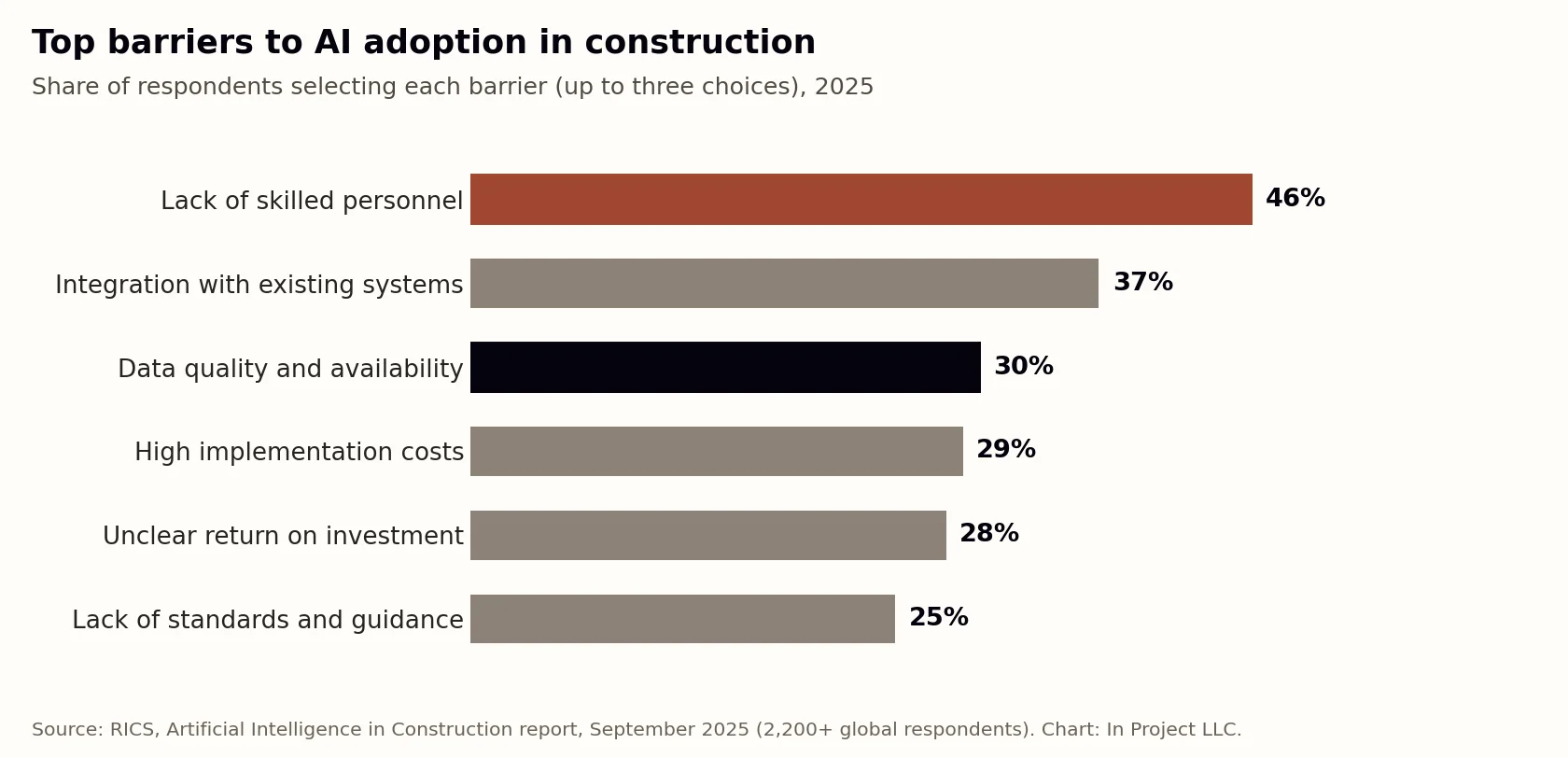
| Can we measure the result in hours, dollars, or days? | Unclear ROI is a top adoption barrier |
| Do we have the data it needs? | Data quality is a top barrier for AI and analytics |
| Will the field actually use it? | Adoption depends on the people doing the work |
| Does it integrate with our current systems? | Integration is the second most cited barrier |
Start with the highest-scoring option and run a time-boxed pilot on one project. Expand only after the result is measured.
A 90-day technology roadmap for project teams
- Days 1 to 30: fix the foundation. Standardize the cost report, change log, RFI and submittal logs, risk register, and weekly report across active projects.
- Days 31 to 60: pilot one AI workflow. Choose RFI triage, risk register drafting, or the weekly report. Measure hours saved and issues caught earlier.
- Days 61 to 90: connect and scale. Automate the data feed for the workflow that worked, train the team, and add a second workflow.
What this means for project managers
Project managers do not need to become technologists, but they do need to understand how their data flows, what each tool is good and bad at, and how to review AI-generated analysis critically. The PMs who combine strong controls fundamentals with practical technology will manage more work with better visibility than those who rely on either alone.
How In Project helps
In Project LLC takes a controls-first approach to construction technology: fix the workflow and the data, then add tools that save time. In Project AI applies AI agents to your existing schedules, budgets, logs, and daily reports to produce risk registers, forecasts, and owner reports for professional review. Contact us to discuss a technology or project controls roadmap.
Sources
- RICS, Artificial Intelligence in Construction report, September 12, 2025.
- Houzz State of AI survey of U.S. construction and design businesses, 2026, as reported by Roofing Contractor.
- Associated General Contractors of America, 2025 Workforce Survey Analysis.
Frequently asked questions
What are the top construction technology trends in 2026?
AI moving into project workflows and agents, connected project data and integrations, BIM and digital twins across the lifecycle, reality capture for progress tracking, field and safety technology, offsite construction, and tools that make a stretched workforce more effective.
How many construction companies use AI?
Estimates vary by survey and region. RICS found in 2025 that about 45% of construction organizations had no AI implementation and just under 12% used it regularly in specific processes, while a 2026 Houzz survey found 52% of U.S. construction and design businesses using AI tools for business tasks.
What is the biggest barrier to AI adoption in construction?
In the RICS 2025 survey, the most cited barrier was lack of skilled personnel (46%), followed by integration with existing systems (37%) and data quality and availability (30%).
Where should a construction company start with new technology?
Start with a real problem on current projects, make sure the underlying data is clean, run a time-boxed pilot on one project, measure the result in hours, dollars, or days, and scale only what works.