Construction project controls, consulting, and In Project AI
AI Agents in Construction Project Management: What They Do and How to Start
AI agents go beyond chatbots: they plan multi-step work, read many documents, use tools, and hand results back for review. Here is what AI agents can do for construction project managers today, where they fall short, how to evaluate them, and how to start safely.
Article summary
AI agents go beyond chatbots: they plan multi-step work, read many documents, use tools, and hand results back for review. Here is what AI agents can do for construction project managers today, where they fall short, how to evaluate them, and how to start safely.
What is an AI agent?
An AI agent is software that uses a large language model to carry out a multi-step task with some independence. Instead of answering one question, an agent can plan the steps, read several documents, run calculations or other tools, check its own intermediate results, and return a finished work product for a person to review.
| Type | What it does | Construction example |
|---|---|---|
| Chat assistant | Answers one prompt at a time | Summarize this RFI response |
| AI workflow | Runs a fixed sequence of prompts on set inputs | Every Monday, summarize the daily reports into a weekly field summary |
| AI agent | Plans and executes a multi-step task, using tools and multiple documents | Review the schedule, cost report, logs, and dailies; find the top risks; estimate exposure; draft the owner report |
| Multi-agent system | Several specialized agents whose results are combined | Separate risk, budget, schedule, document, and reporting agents feeding one synthesized report |
For a guide to simpler, prompt-based uses, see 10 practical AI workflows for construction PMs. This article focuses on agents.
What AI agents can do for a construction project manager today
Cross-document risk review
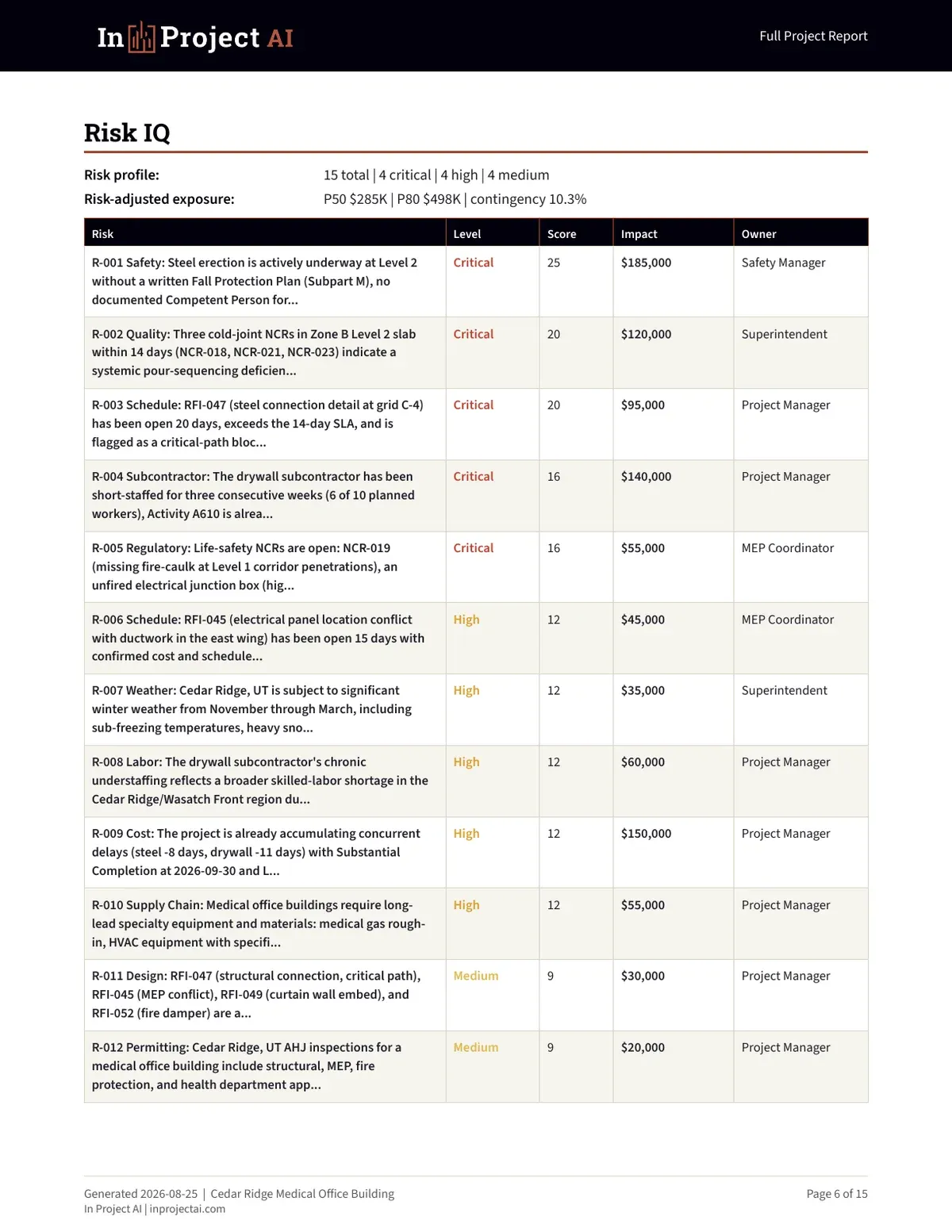
A risk agent can read the schedule, daily reports, RFI log, change log, and meeting minutes together and notice connections a busy PM might miss: an RFI blocking a critical activity that is also the subject of a pending change, with a subcontractor already short-staffed in the same area.
Budget and forecast analysis
A budget agent can reconcile the cost report with commitments and the change log, identify lines where the estimate to complete looks unrealistic, compare remaining contingency with risk exposure, and flag pending changes not yet in the forecast. See our cost control guide for the underlying method.
Schedule analysis
A schedule agent can compare updates, list slipping milestones, find activities losing float, and connect delays to open RFIs, submittals, inspections, or deliveries.
Document control
Document agents can check submittals against specification requirements, identify RFIs past their required dates, and spot conflicts between documents, such as a revised drawing that affects an approved submittal.
Owner and executive reporting
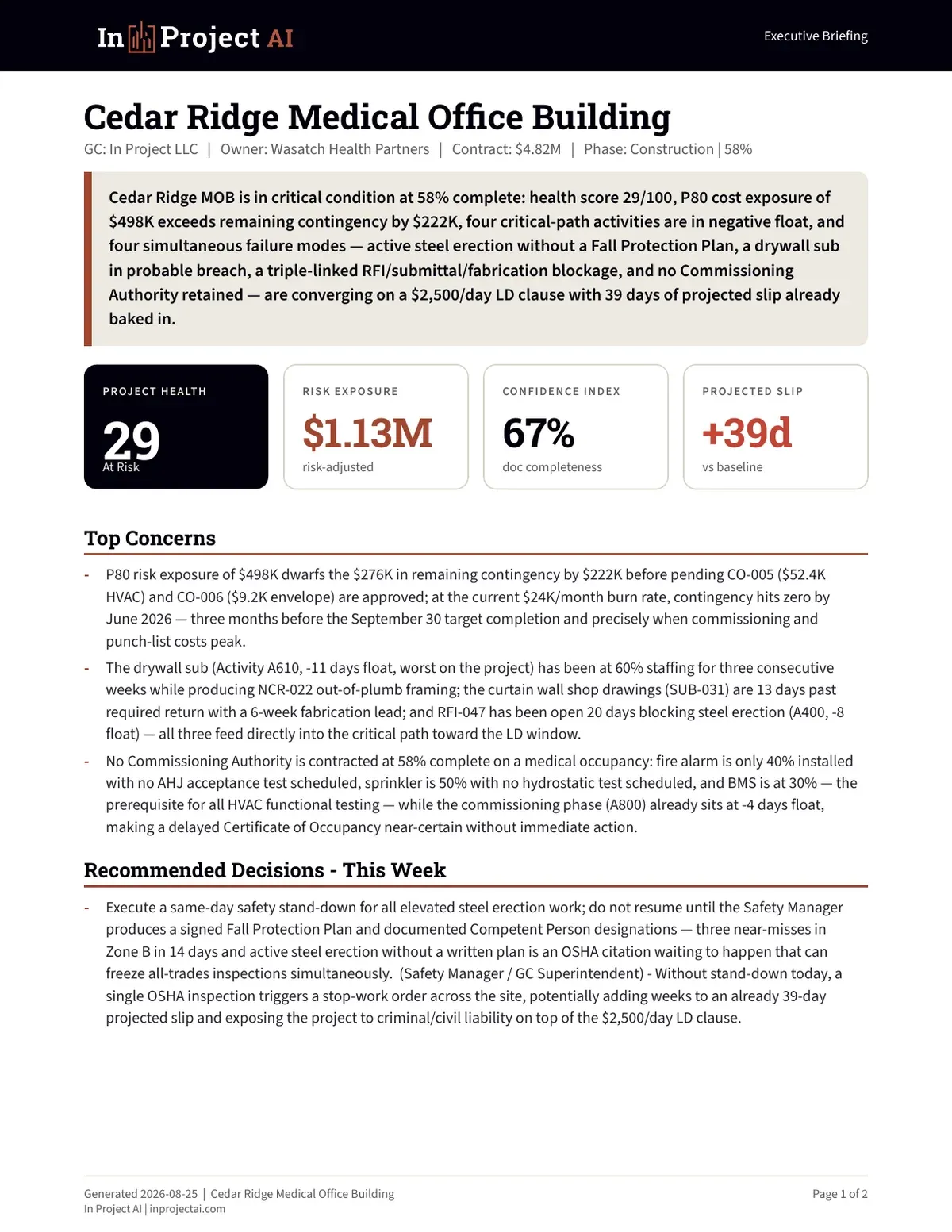
A reporting agent can take the findings from the other agents and draft a one-page executive briefing with health, exposure, top concerns, and recommended decisions.
Why multiple agents beat one big prompt
Construction problems usually sit across disciplines. A single prompt asked to "review this project" tends to give generic answers. Specialized agents, each with a narrow job and the right inputs, produce more specific findings, and a final synthesis step connects them. This is how In Project AI is designed: modules for risk, budget, schedule, documents, RFIs, submittals, change orders, pay applications, safety, punch lists, and owner reporting run together and their findings are cross-checked before the report is assembled.
A day in the life: an agent-assisted controls review
Here is how an AI agent fits into a real week on a mid-size project.
- Monday morning. The project engineer exports the RFI and submittal logs, the superintendent's daily reports from last week, the latest cost report, and the schedule update.
- Monday midday. The agent reads everything, compares it with last week's run, and produces a draft: new risks, aging RFIs on the critical path, forecast movements, pending changes not yet in the forecast, and a proposed action list.
- Monday afternoon. The project manager spends 30 to 45 minutes reviewing the draft, correcting two findings that were already resolved in conversation, and adding context the agent could not know.
- Tuesday. The reviewed findings drive the weekly controls meeting: the team works the top risks and overdue items instead of compiling them.
- Wednesday. The owner report goes out, built from the reviewed draft, with decisions needed and dates.
The time saved is mostly in reading and compiling. The real gain is that issues buried in a daily report or a log line surface the same week instead of the next month.
Questions to ask your team before adopting agents
- Are our logs consistent enough across projects for an agent to read them reliably?
- Who will review agent output, and how much time will we give them to do it?
- Which owners or contracts restrict where project data can be processed?
- What would we stop doing manually if the agent proves accurate?
- How will we measure whether the agent is catching issues earlier?
Where AI agents fall short
- They only know what you give them. Missing or outdated logs produce confident but incomplete conclusions.
- They can be wrong with confidence. Agents can misread a table or overstate an issue. Every number needs a source you can check.
- They do not understand relationships. An agent does not know that the owner's representative prefers a phone call before bad news arrives in writing.
- They do not hold authority. Contract positions, safety calls, and commercial decisions belong to accountable people.
- They are not a substitute for clean controls. Agents amplify a good controls system; they cannot replace one.
How to evaluate an AI agent for project controls
| Question | What good looks like |
|---|---|
| Does it cite sources? | Every finding references the document, log line, or date |
| Can it handle your real files? | Accepts your schedule, cost, and log exports without heavy reformatting |
| Is the output reviewable? | Clear tables and reports a PM can check in minutes, with editable Excel |
| What happens to your data? | Clear retention, deletion, and no training of public models on your documents |
| Does it show confidence or gaps? | Flags missing documents and low-confidence conclusions |
| Who reviews before sharing? | The workflow assumes professional review before anything reaches the owner |
Ask any vendor to run the agent on a sanitized past project where you already know what went wrong. If it finds those issues, with sources, it is worth a pilot.
Governance: keeping a human in the loop
- Define what the agent may and may not do. For example: draft and recommend, never send or approve.
- Assign a reviewer for every output. Usually the project manager.
- Keep an audit trail. Save the inputs, outputs, and the reviewed version.
- Agree on data rules with the owner. Some contracts restrict where project data can be processed.
- Review accuracy quarterly. Track issues the agent caught, missed, or got wrong.
How to start with AI agents
| Phase | What to do |
|---|---|
| 1. Clean inputs | Standardize the cost report, change log, RFI and submittal logs, and risk register |
| 2. Pilot | Run an agent on one project for four weeks alongside your normal process |
| 3. Compare | Track what the agent found earlier, what it missed, and time saved |
| 4. Integrate | Make the agent's draft the starting point of the weekly controls review |
| 5. Scale | Extend to more projects once accuracy and review habits are stable |
What comes next: agents that work with other agents
The next step is agents that connect directly to the systems you already use and to each other: a scheduling agent that reads the latest P6 update, a cost agent that pulls committed cost from accounting, and a reporting agent that assembles the owner briefing. Open standards such as the Model Context Protocol (MCP) are making these connections easier, which means project data will increasingly flow to agents without manual exports. The fundamentals will not change: clean data, clear ownership, and professional review.
How In Project helps
In Project LLC combines project controls consulting with In Project AI, a multi-agent platform that turns your construction documents into risk registers, forecasts, schedule concerns, action items, and owner-ready reports. You can review a real sample report before uploading anything, or contact us to discuss a pilot.
Frequently asked questions
What is an AI agent in construction?
An AI agent is software that uses a language model to carry out multi-step work, such as reading a project's schedule, cost report, and logs, identifying risks, estimating exposure, and drafting a report, then returning the result for a project manager to review.
How are AI agents different from ChatGPT?
A chat assistant answers one prompt at a time. An agent plans and executes a sequence of steps, works across many documents, can use tools such as calculations, and produces a finished work product such as a risk register or owner report.
Can AI agents manage a construction project?
No. Agents can analyze, flag, and draft, but contracts, safety, relationships, and decisions remain the responsibility of qualified project managers. Agents work best as a force multiplier for an experienced team.
Are AI agents safe for confidential project data?
It depends on the provider. Look for clear data retention and deletion terms, no training of public models on your documents, and compliance with your owner's data requirements.
What is a multi-agent AI system?
A system where several specialized agents, for example risk, budget, schedule, and document agents, each analyze part of the project and a final step combines and cross-checks their findings into one report.