Construction project controls, consulting, and In Project AI
Data-Driven Construction Project Management: A Practical Guide
Data-driven project management means making cost, schedule, and risk decisions from consistent project data instead of memory and gut feel. This guide covers the data sources construction teams already have, the metrics that matter, a maturity model, and how to start without a data team.
Article summary
Data-driven project management means making cost, schedule, and risk decisions from consistent project data instead of memory and gut feel. This guide covers the data sources construction teams already have, the metrics that matter, a maturity model, and how to start without a data team.
What data-driven project management means
Data-driven project management is the practice of making project decisions from consistent, current data rather than memory, anecdotes, or the loudest voice in the meeting. In construction, that means the forecast is built from commitments and real progress, schedule calls are based on float and constraints, and risks are scored and tracked instead of discussed and forgotten.
It does not require a data science team or an expensive platform. Most construction projects already produce more data than they use. The shift is in structure, consistency, and habit: collecting the same data the same way, reviewing it on a fixed rhythm, and using it to decide.
Why it matters in construction
- Earlier warning. Trends in cost, float, and aging items show up in data before they show up in the field.
- Better owner conversations. Numbers with sources are easier to discuss than opinions.
- Faster onboarding. A new PM can take over a job quickly when the data tells the story.
- Better estimating and bidding. Actual cost and productivity from past jobs improve the next estimate.
- Fewer disputes. A consistent record of progress, changes, and decisions supports both owner and contractor.
Industry research consistently points to the cost of poor information. FMI and PlanGrid's 2018 Construction Disconnected study estimated that searching for project data, resolving conflicts, and rework cost the U.S. construction industry more than $177 billion a year, with poor project information behind about 22% of rework.
The data construction teams already have
| Data source | What it tells you | Typical system |
|---|---|---|
| Budget and cost report | Committed, actual, and forecast cost by cost code | Accounting or ERP system, spreadsheets |
| Schedule | Planned and actual dates, float, critical path | Primavera P6, Microsoft Project |
| Change order log | Approved, pending, and potential changes and their aging | PM platform or spreadsheet |
| RFI and submittal logs | Document control status, aging, responsibility | PM platform such as Procore or Autodesk Construction Cloud |
| Daily reports | Labor, equipment, weather, work performed, delays | Field app or PM platform |
| Pay applications and schedule of values | Billed progress by line item | Accounting or pay app system |
| Risk register | Scored risks, owners, mitigations | Spreadsheet or PM platform |
| Safety and quality records | Incidents, observations, inspections, NCRs | Safety and quality apps |
The challenge is rarely missing data. It is data that is inconsistent, out of date, or locked in separate systems that nobody brings together.
Metrics that actually drive decisions
| Area | Metric | Decision it supports |
|---|---|---|
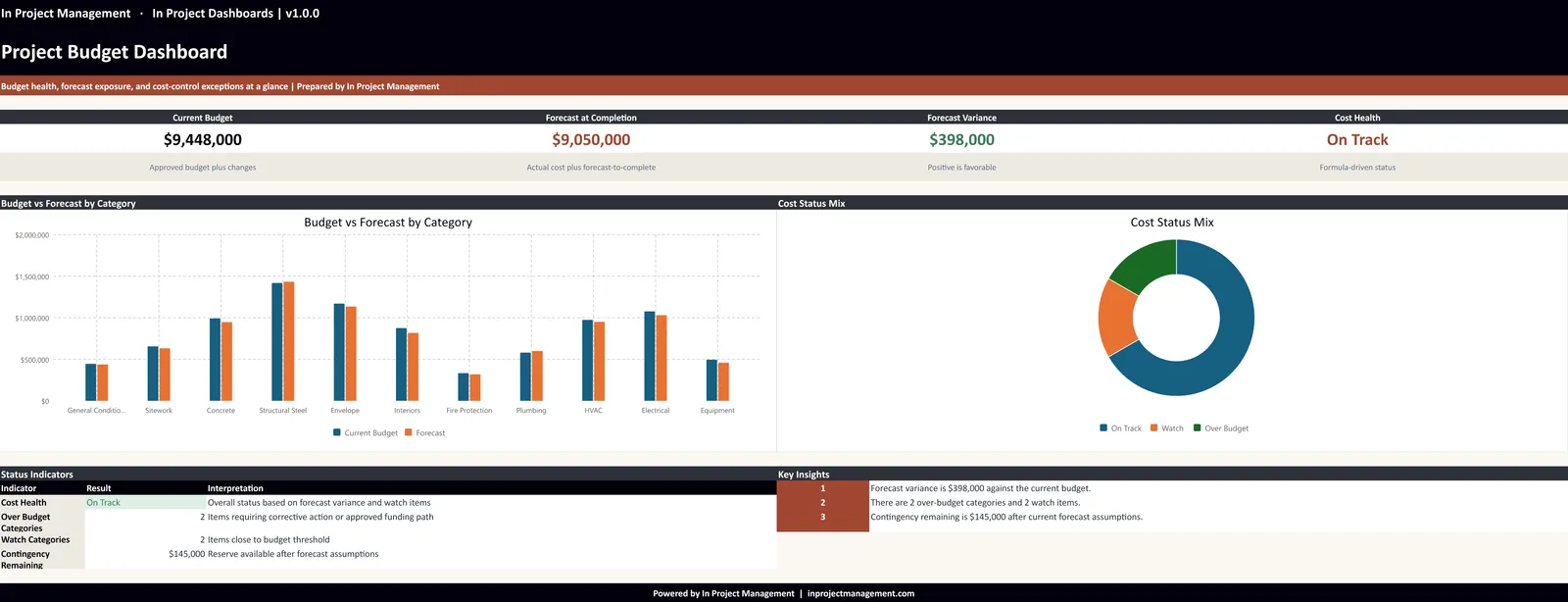
| Cost | Forecast at completion vs. current budget; month-over-month change | Whether to take corrective action or request owner decisions |
| Cost | Contingency remaining vs. risk exposure | Whether contingency is sufficient |
| Schedule | Milestone variance; float trend on critical activities | Where to add resources or resequence |
| Schedule | Look-ahead completion rate (percent plan complete) | Whether planning is reliable |
| Change | Pending exposure and decision aging | Which decisions to escalate |
| Documents | Open and overdue RFIs and submittals by responsible party | Who to push and when |
| Labor | Crew size vs. plan by trade | Whether a subcontractor is falling behind |
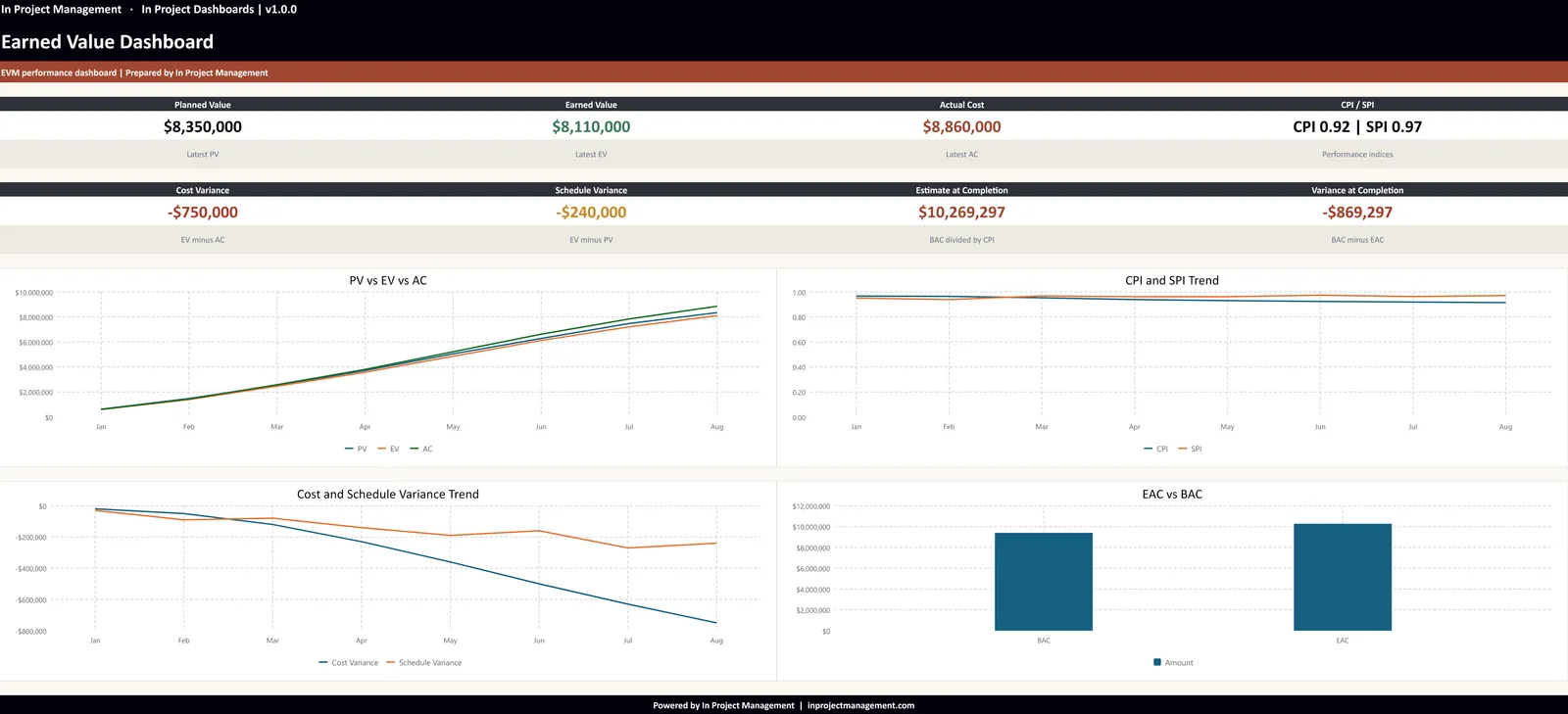
| Performance | CPI and SPI from earned value | Whether the project is efficient on cost and time |
A data maturity model for construction teams
| Level | Description | Typical next step |
|---|---|---|
| 1. Ad hoc | Data lives in emails and individual spreadsheets; reports are rebuilt each month | Standardize the core logs and report template |
| 2. Standardized | Same logs and report format on every project, updated on a fixed day | Add clear owners and status thresholds |
| 3. Measured | KPIs tracked weekly with trends and defined red and yellow thresholds | Add forecasting and earned value |
| 4. Integrated | Data pulled from source systems into dashboards with little re-entry | Compare projects and build benchmarks |
| 5. Predictive | Historical data and AI used to flag likely problems early | Continuous improvement and estimating feedback |
Most mid-size contractors and owners are at level 1 or 2. Moving up one level usually delivers more value than buying a new tool.
How to start without a data team
- Standardize five logs. Cost report, change log, RFI and submittal log, risk register, and weekly report. Same columns and statuses on every project.
- Assign an owner and update day for each. Data is only useful if it is current.
- Pick eight metrics and stop there. Use the table above as a starting point.
- Write down thresholds. Define what turns a metric yellow or red.
- Review the data weekly. Put the dashboard on the screen in the project meeting.
- Close the loop at project end. Capture actual cost, duration, change percentages, and lessons learned for future estimates.
Example: one decision, two approaches
Consider a common question on a mid-size building project: should the team authorize overtime for the drywall subcontractor to protect the interior finishes milestone?
| Question | Gut-feel approach | Data-driven approach |
|---|---|---|
| Are we behind? | "It feels slow on level 3" | Crew at 6 of 10 planned for three weeks; activity float down from +4 to -11 days |
| Does it matter? | "Finishes always get squeezed" | Activity is on the critical path to substantial completion; liquidated damages apply after the contract date |
| What will it cost? | "Overtime is expensive" | Estimated overtime premium compared with daily liquidated damages and extended general conditions |
| What else could work? | "Push the sub" | Cure notice, crew minimum, backup trade, or resequencing, each with a cost and time estimate |
| Decision | Delayed until the problem is obvious | Made this week with the owner, documented in the weekly report |
The data did not make the decision. It made the decision clearer, faster, and easier to defend.
Benchmarking across projects
Once several projects use the same logs and metrics, the data becomes even more valuable. Teams can compare change order percentages by project type, average RFI response times by design firm, contingency used by phase, or productivity by trade. Those benchmarks improve estimates, contract terms, and staffing decisions on the next job.
- Track change orders as a percentage of contract value by cause.
- Measure average days to answer RFIs and approve submittals by responsible party.
- Record contingency used at each major milestone.
- Capture actual durations for key activities by building type.
Even five or ten comparable projects are enough to start seeing patterns that change how you bid and plan.
Data quality: the hidden problem
Dashboards built on poor data are worse than no dashboard, because they create false confidence. The most common data quality problems in construction are simple:
- Inconsistent cost codes between estimate, budget, and accounting.
- Logs updated only before the owner meeting.
- Statuses with different meanings on different projects.
- Dates entered as text, making aging impossible to calculate.
- Pending changes tracked in email instead of the log.
Fixing these is not glamorous, but it is the foundation for everything else, including AI.
Roles in a data-driven project team
| Role | Data responsibility |
|---|---|
| Project manager | Owns the forecast, change log, risk register, and weekly report; makes the calls |
| Project engineer | Keeps RFI and submittal logs current with required-by dates |
| Superintendent | Daily reports, crew counts, look-ahead progress, and constraints |
| Scheduler | Schedule updates, float analysis, and milestone forecasts |
| Accounting or cost engineer | Commitments, actual cost, and pay application data |
Clear data ownership matters more than any tool. When everyone knows which numbers they own and when they are due, the data stays trustworthy.
Where AI fits
AI is most useful at levels 2 to 5 of the maturity model. Once logs are consistent, AI tools can read across them, find connections, and draft analysis much faster than a person compiling spreadsheets. In Project AI reads schedules, budgets, change logs, RFI and submittal logs, pay applications, and daily reports together and produces risk registers, forecasts, schedule concerns, and owner reports for professional review. For practical ways to start, see 10 AI workflows for construction PMs.
How In Project helps
In Project LLC helps construction teams move up the data maturity curve: standard logs, clear KPIs, practical dashboards, and a weekly review rhythm. Contact us about a project controls or reporting review.
Frequently asked questions
What is data-driven project management in construction?
It is making cost, schedule, risk, and change decisions from consistent, current project data such as cost reports, schedules, logs, and daily reports, reviewed on a fixed rhythm, rather than from memory or anecdote.
What data should construction project managers track?
Start with forecast at completion versus budget, contingency versus risk exposure, milestone variance and float, pending change exposure and aging, overdue RFIs and submittals, crew size versus plan, and CPI and SPI if earned value is used.
Do I need special software for data-driven project management?
No. Standardized spreadsheets and a consistent weekly review are enough to start. Integrated platforms, business intelligence tools, and AI add value once the underlying data is consistent.
How does AI help with construction data?
AI can read across schedules, cost reports, logs, and daily reports, connect related issues, and draft risk registers, forecasts, and reports much faster than manual compilation, as long as the input data is reasonably clean and a professional reviews the output.