Construction project controls, consulting, and In Project AI
What Are Project Controls in Construction? A Complete Guide
Project controls are the processes, data, and reviews that keep a construction project's cost, schedule, risk, and changes visible and under management. This guide explains each component, the weekly controls cycle, key KPIs, roles, and how to set controls up on your next job.
Article summary
Project controls are the processes, data, and reviews that keep a construction project's cost, schedule, risk, and changes visible and under management. This guide explains each component, the weekly controls cycle, key KPIs, roles, and how to set controls up on your next job.
Project controls in one sentence
Project controls are the processes, data, and regular reviews a construction team uses to plan, measure, forecast, and correct a project's cost, schedule, scope, and risk so leaders can act before small problems become expensive ones.
Every project has a budget and a schedule. Project controls are what keep them honest. They answer four questions every week: Where are we against the plan? Where will we finish? What changed? What do we need to decide? A project with strong controls can answer those questions in minutes. A project without them finds out at the end.
Why project controls matter
Construction is a sequence of handoffs. Design details change, procurement dates shift, field conditions appear, RFIs need answers, and cost exposure can grow long before a change order is formally approved. No single person sees all of it at once. Project controls create one consistent view of the project so the owner, contractor, and design team are working from the same facts.
- Earlier warnings. A forecast that moves by $150,000 this month is a warning. Actual cost alone will not show it until the money is spent.
- Faster decisions. When pending changes, late RFIs, and open risks are listed with owners and dates, meetings focus on decisions instead of status updates.
- Fewer disputes. A documented change log and schedule history protect both owner and contractor when time or cost is challenged.
- Better owner confidence. Clear, consistent reporting is often what separates the contractor an owner hires again from the one they do not.
The six components of construction project controls
| Component | What it controls | Key outputs |
|---|---|---|
| Cost control | Budget, commitments, actual cost, forecast | Cost report, forecast at completion, contingency log |
| Schedule control | Baseline schedule, progress, critical path | Schedule updates, look-aheads, milestone report |
| Risk management | Threats and opportunities to cost and time | Risk register with scores, owners, mitigations |
| Change management | Scope, cost, and time changes | Change order log, pending exposure, decision aging |
| Document control | RFIs, submittals, drawings, approvals | RFI and submittal logs with required dates |
| Reporting and performance | Status, trends, decisions needed | Weekly report, owner report, KPI dashboard |
1. Cost control
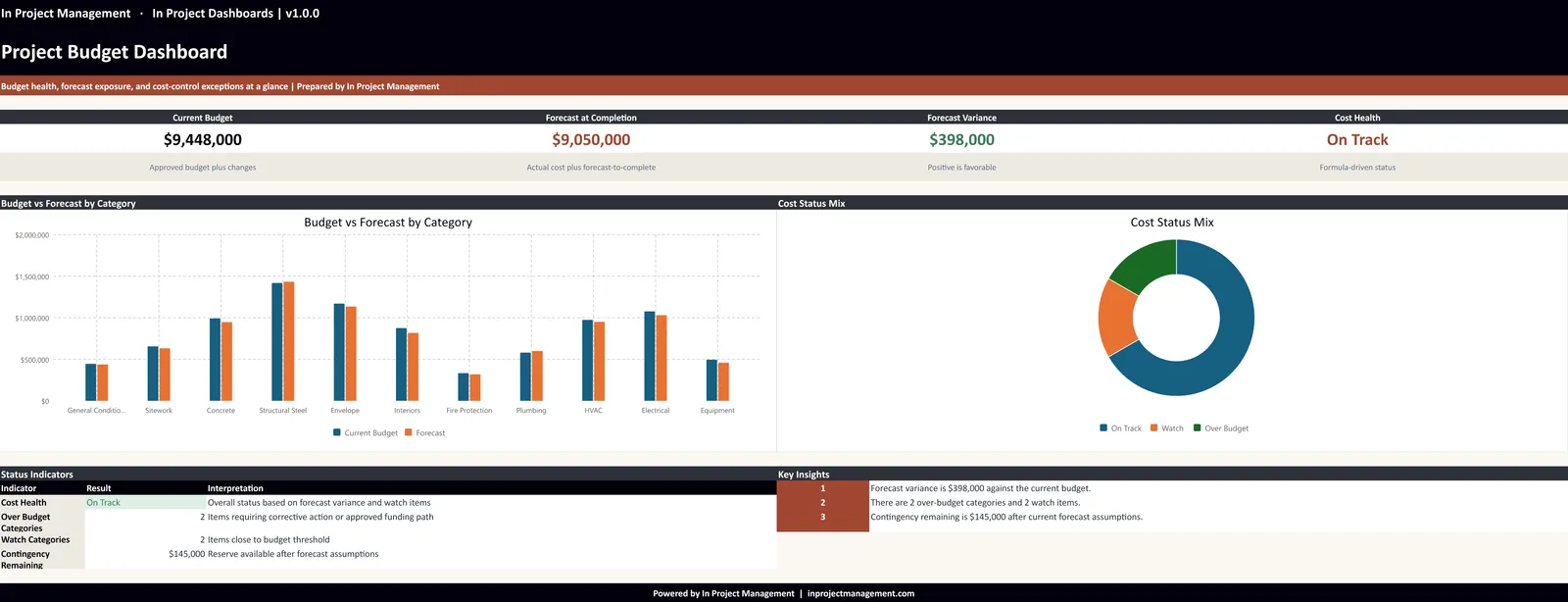
Cost control tracks the original budget, approved changes, current budget, committed cost (subcontracts and purchase orders), actual cost, and the estimate to complete. The core output is the forecast at completion (FAC) and its variance to budget. The most important discipline is separating approved changes from pending exposure and potential risks, so leaders can see both the committed forecast and the risk-adjusted one.
2. Schedule control
Schedule control starts with a realistic baseline (usually a CPM schedule) and updates it with actual progress on a regular cycle. The useful outputs are milestone variance, float trends on critical and near-critical paths, a three- or six-week look-ahead, and a list of constraints that threaten upcoming work. The goal is to explain why dates move, not only that they moved.
3. Risk management
A risk register lists each risk with a likelihood, impact, score, owner, mitigation action, and due date. In construction, the most common risk categories are design completeness, procurement and long-lead items, subcontractor performance, site conditions, weather, permits and inspections, and safety. A risk register only works if it is reviewed and updated in the regular project meeting.
4. Change management
Change management covers how changes are identified, priced, reviewed, approved, and incorporated into the budget and schedule. A good change log shows potential changes, submitted change orders, approved and rejected value, pending exposure, how long each decision has been waiting, and any time impact claimed.
5. Document control
RFIs, submittals, drawing revisions, and approvals are where many schedule problems begin. Document control means every RFI and submittal has a responsible party, a required-by date tied to the schedule, and an escalation rule when it ages. An RFI open for 20 days on a critical activity is a schedule risk, not just an administrative item.
6. Reporting and performance measurement
Reporting turns the controls data into decisions. Project teams need a weekly report focused on actions; owners and executives need a monthly view focused on health, exposure, and decisions. Many programs also use earned value management (EVM) to measure cost and schedule performance together. For report formats, see our guide to construction dashboards.
The weekly project controls cycle
Project controls are not a one-time setup. They are a rhythm. Most projects run on a weekly cycle, with a deeper monthly review for forecasting and owner reporting.
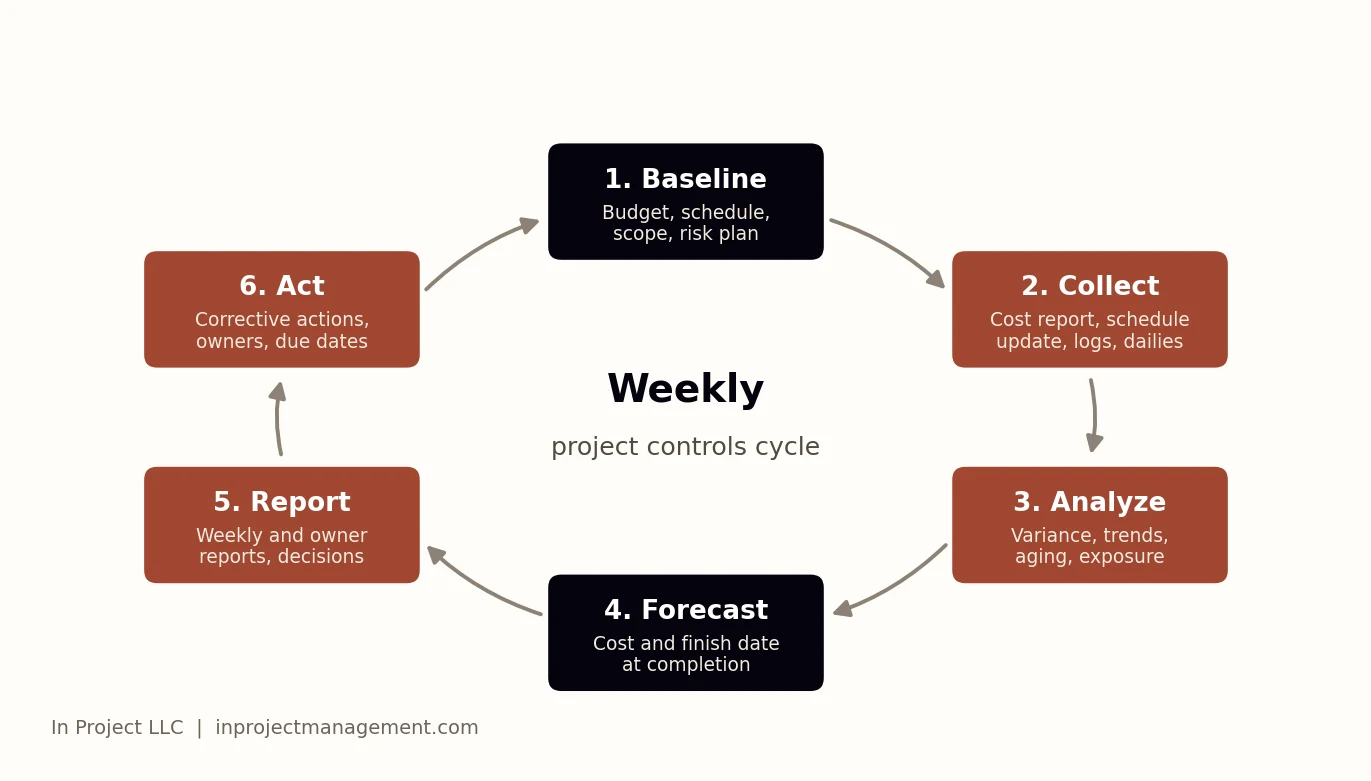
- Baseline. Approve the budget, schedule, scope, and initial risk register. This is the yardstick for everything that follows.
- Collect. Update the cost report, schedule progress, change log, RFI and submittal logs, and daily reports, usually early in the week.
- Analyze. Compare against the baseline and last period: cost and schedule variance, aging items, new risks, and trends.
- Forecast. Update the forecast at completion and the forecast finish date, including known exposure.
- Report. Publish the weekly report and highlight decisions needed, with owners and due dates.
- Act. Assign corrective actions and track them to closure in the next cycle.
Key project controls KPIs
| KPI | What it tells you |
|---|---|
| Forecast at completion vs. current budget | Whether the project will finish within the approved budget |
| Change in forecast since last period | Whether cost is drifting and why |
| Contingency remaining and burn rate | How much buffer is left for unknowns |
| Pending change exposure | Cost not yet approved but likely |
| Milestone variance (days) | Which key dates are slipping |
| Critical path float | How much schedule margin remains |
| Open and overdue RFIs and submittals | Where documentation is holding up work |
| CPI and SPI | Cost and schedule efficiency from earned value |
Track a small set of KPIs reliably rather than dozens occasionally. Five well-maintained indicators beat thirty stale ones.
Who owns project controls
On large programs, a dedicated project controls team includes cost engineers, schedulers, and a project controls manager. On most mid-size projects, controls are shared between the project manager, project engineer, superintendent, and accounting. What matters is not the job title but clear ownership: one person owns each log, updates it on a fixed day, and is accountable for its accuracy.
| Controls item | Usual owner |
|---|---|
| Cost report and forecast | Project manager with accounting or a cost engineer |
| Schedule updates and look-ahead | Scheduler or superintendent |
| Change order log | Project manager |
| RFI and submittal logs | Project engineer |
| Risk register | Project manager, reviewed by the whole team |
| Weekly and owner reports | Project manager |
How to set up project controls on your next project
- Agree on the baseline. Lock the budget by cost code, the baseline schedule, and the initial risk register before work starts.
- Pick one format for each log. Use the same cost report, change log, RFI and submittal log, and risk register on every job.
- Assign an owner and an update day for each log. For example, cost report on Monday, schedule on Tuesday, weekly report on Wednesday.
- Write down the thresholds. Define what turns a status yellow or red so the colors mean the same thing to everyone.
- Hold a 30-minute controls review each week. Walk through forecast changes, top risks, aging RFIs, and pending changes.
- Report decisions, not just status. Every report should end with what the owner or team needs to decide and by when.
Common project controls mistakes
- Reporting actual cost without a forecast at completion.
- Folding pending changes into the forecast without labeling them.
- Updating the schedule only for monthly pay applications.
- Keeping a risk register that nobody reviews after kickoff.
- Tracking RFIs and submittals without required-by dates.
- Writing long narrative reports that never state the decision needed.
Tools and AI for project controls
Most teams run controls on a mix of accounting software, a scheduling tool such as Primavera P6 or Microsoft Project, a project management platform for RFIs and submittals, and spreadsheets for the forecast and risk register. The challenge is pulling those sources together every week.
AI-assisted tools are now able to read those exports and draft the analysis. In Project AI reviews schedules, budgets, RFI and submittal logs, change logs, pay applications, and daily reports together and produces a risk register, budget forecast, schedule concerns, and an owner-ready report. It shortens the collect and analyze steps of the cycle; the project team still reviews and decides.
How In Project helps
In Project LLC is a Salt Lake City project controls consulting firm. We help owners, developers, and contractors set up practical controls, clean up logs and reporting, and run a weekly rhythm that leaders trust. Learn more about our project controls services or contact us for a project controls review.
Frequently asked questions
What are project controls in construction?
Project controls are the processes, data, and regular reviews used to plan, measure, forecast, and correct a construction project's cost, schedule, scope, and risk. They include cost control, schedule control, risk management, change management, document control, and reporting.
What is the difference between project management and project controls?
Project management is the overall leadership of the project: people, contracts, coordination, and decisions. Project controls is the measurement and forecasting system that gives project managers accurate information about cost, schedule, risk, and change so they can make those decisions.
What does a project controls manager do?
A project controls manager owns the cost reporting, forecasting, scheduling oversight, change tracking, risk register, and performance reporting for a project or program, and makes sure those systems are updated and reviewed on a regular cycle.
What are the most important project controls KPIs?
Forecast at completion versus budget, change in forecast since the last period, contingency remaining, pending change exposure, milestone variance, critical path float, overdue RFIs and submittals, and CPI and SPI if earned value is used.
How often should project controls be updated?
Most construction projects update controls weekly and do a deeper forecasting and owner review monthly. RFI and submittal logs on active jobs are often reviewed daily.