Construction project controls, consulting, and In Project AI
How to Review a Construction Pay Application (G702/G703): A Step-by-Step Checklist
A practical checklist for owners, owner's representatives, and lenders reviewing a contractor's pay application: how the G702 summary and G703 continuation sheet fit together, a worked example, the red flags that cause overpayment, retainage, stored materials, lien waivers, and how to speed up the review.
Article summary
A practical checklist for owners, owner's representatives, and lenders reviewing a contractor's pay application: how the G702 summary and G703 continuation sheet fit together, a worked example, the red flags that cause overpayment, retainage, stored materials, lien waivers, and how to speed up the review.
Why pay application review matters
A monthly pay application is where cost control becomes real money. Approve too much and the owner is financing work that is not yet in place, with less leverage if a subcontractor defaults. Approve too little or too slowly and cash flow problems ripple down to the trades and onto the schedule. A disciplined review protects the owner, keeps the contractor paid fairly, and creates a clean record for closeout.
This guide walks through the industry-standard pay application format used on many U.S. commercial projects, the AIA G702 Application and Certificate for Payment with its G703 Continuation Sheet, and gives a step-by-step checklist that works for owners, owner's representatives, construction managers, and lenders. The same principles apply if your contract uses a different form.
How a pay application is structured
Most pay applications have two parts: a one-page summary that calculates the payment due, and a detailed continuation sheet that breaks the contract into a schedule of values and shows progress line by line.
The G703 continuation sheet (the detail)
| Column | Name | What it shows |
|---|---|---|
| A | Item number | Line reference in the schedule of values |
| B | Description of work | The scope for that line |
| C | Scheduled value | Value assigned to the line in the schedule of values |
| D | Work completed from previous application | Value billed on prior applications |
| E | Work completed this period | Value of work installed this period |
| F | Materials presently stored | Materials stored but not yet installed |
| G | Total completed and stored to date | D + E + F, with percent complete as G divided by C |
| H | Balance to finish | C minus G |
| I | Retainage | Retainage held on the line, if calculated per line |
The G702 summary (the math)
| Line | Item |
|---|---|
| 1 | Original contract sum |
| 2 | Net change by change orders |
| 3 | Contract sum to date (line 1 plus line 2) |
| 4 | Total completed and stored to date (total of column G) |
| 5 | Retainage on completed work and on stored material |
| 6 | Total earned less retainage (line 4 minus line 5) |
| 7 | Less previous certificates for payment |
| 8 | Current payment due (line 6 minus line 7) |
| 9 | Balance to finish, including retainage (line 3 minus line 6) |
The contractor signs the summary, and on many projects it is notarized, then the architect or owner's representative reviews and certifies the amount due. AIA, G702, and G703 are trademarks of the American Institute of Architects; In Project is not affiliated with AIA.
A worked example
Here is how the summary math works on a sample application.
| Line | Item | Amount |
|---|---|---|
| 1 | Original contract sum | $4,800,000 |
| 2 | Net change by approved change orders | +$120,000 |
| 3 | Contract sum to date | $4,920,000 |
| 4 | Total completed and stored to date | $3,200,000 |
| 5a | Retainage: 5% of completed work ($3,104,000) | $155,200 |
| 5b | Retainage: 5% of stored material ($96,000) | $4,800 |
| 6 | Total earned less retainage ($3,200,000 - $160,000) | $3,040,000 |
| 7 | Less previous certificates for payment | $2,560,000 |
| 8 | Current payment due | $480,000 |
| 9 | Balance to finish, including retainage ($4,920,000 - $3,040,000) | $1,880,000 |
Every number on the summary should trace back to the continuation sheet, the change order log, and the previous certificate. If line 7 does not match line 6 of the last approved application, stop and reconcile before going further.
The 10-step pay application review checklist
- Check the schedule of values. Confirm it matches the approved version. Lines should not be added, renamed, or rebalanced without approval. Watch for front-loading, where early activities such as mobilization or general conditions carry more value than they should.
- Reconcile the contract sum. Line 1 should match the contract and line 2 should match the total of executed change orders only. Pending or proposed changes do not belong on the pay application.
- Verify previous billing. Column D should equal the total billed through the last approved application, line by line.
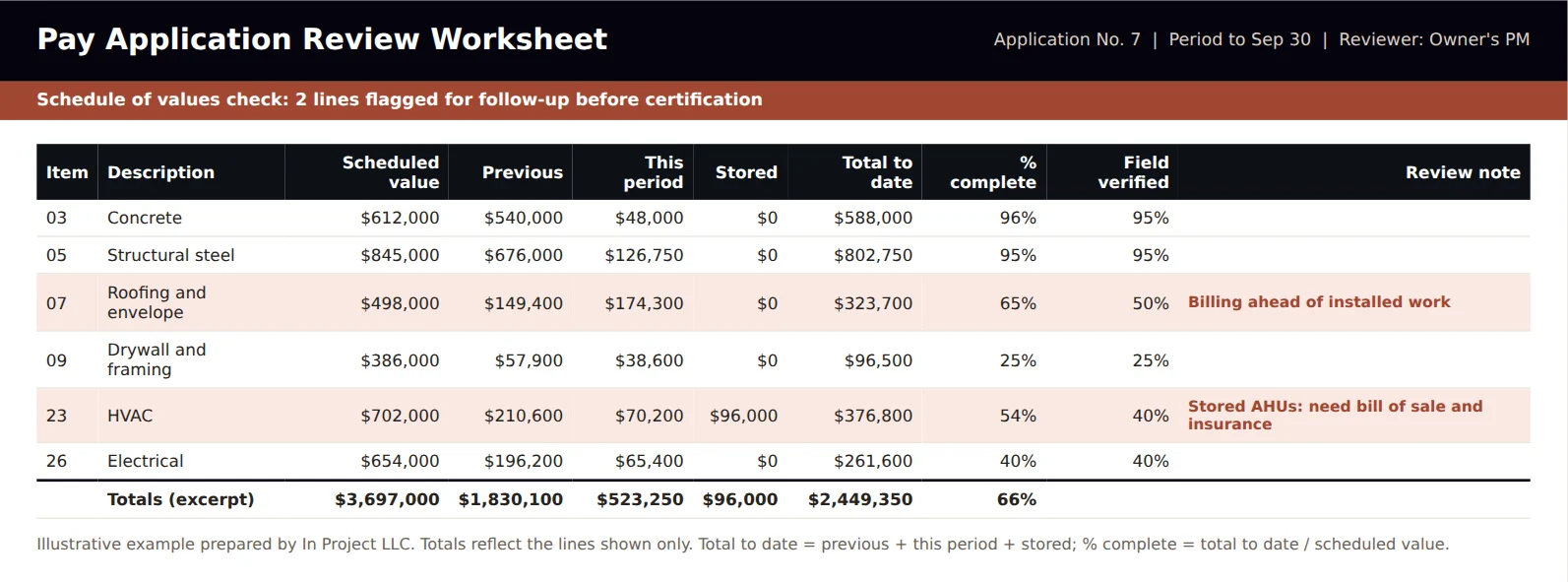
- Walk the site. Compare percent complete on each major line with what is actually installed. This is the most important step and the one most often skipped.
- Review stored materials. Confirm the contract allows payment for stored materials and that the required backup is attached: invoices, bill of sale, proof of insurance, and photos. Materials stored off site may need inspection or additional documentation.
- Check retainage. Confirm the retainage percentage matches the contract and any reduction milestones, and that it is applied consistently to completed work and stored materials.
- Collect lien waivers. Require the contractor's conditional waiver for this payment and unconditional waivers from the contractor and major subcontractors for the previous payment, according to your contract and state law.
- Compare with the schedule. Billing far ahead of the schedule update is a warning sign; billing far behind may signal cash flow problems or unbilled changes.
- Check the math. Recalculate columns G, H, and the summary lines. Simple arithmetic errors are more common than you would expect.
- Document your adjustments. If you reduce any line, record the reason, the amount, and the date, and communicate it to the contractor before certification.
Red flags that lead to overpayment
| Red flag | What it may mean | What to do |
|---|---|---|
| Early lines billed far above field progress | Front-loading or optimistic billing | Adjust to verified progress; review the schedule of values |
| Stored materials without backup | Payment for materials that may not exist or are not insured | Hold the stored amount until documentation is provided |
| Pending changes included in billing | Billing unapproved work | Remove until the change order is executed |
| Percent complete jumps with no schedule progress | Billing out of sequence | Ask for support and verify in the field |
| Missing or outdated lien waivers | Risk of liens from unpaid subcontractors or suppliers | Hold payment until waivers are received |
| General conditions billed faster than time elapsed | Overbilling of time-based costs | Bill general conditions in proportion to time or progress, per the contract |
Retainage basics
Retainage is a percentage of each payment held back until a defined point, often substantial completion, as security for completing the work and correcting defects. Common rates on U.S. private projects are 5% to 10%, and many contracts reduce retainage once the project is half complete if performance is satisfactory. Public projects and many states set limits on retainage and on how quickly it must be released, so always check your contract and the law in the project's state.
Track retainage held by the contractor and, separately, retainage the contractor holds from subcontractors. Closeout goes faster when retainage release conditions and required documents are clear from the start.
Lien waivers: conditional and unconditional
Lien waivers protect the owner from mechanics' liens by subcontractors and suppliers who were not paid. A conditional waiver becomes effective only when payment is received; an unconditional waiver confirms payment has already been received. A common practice is to require conditional waivers with the current application and unconditional waivers for the previous payment. Several states mandate specific statutory waiver forms, so use the forms your state requires.
How to speed up pay application reviews
- Agree on the schedule of values early. Break large lines into measurable pieces and avoid lump-sum lines over a set size.
- Hold a pencil draft review. Many teams walk a draft application a few days before submission so the formal application needs few changes.
- Tie billing to the schedule. Map schedule of values lines to schedule activities so percent complete can be checked against the update.
- Use a standard checklist. The same 10 steps every month make reviews faster and more consistent.
- Track waivers and stored materials in a log. Do not rely on email attachments.
Using AI to review pay applications
Pay application review involves a lot of cross-checking: the continuation sheet against the previous application, the change order log, the schedule update, daily reports, and lien waiver records. AI tools can do much of that comparison quickly and flag lines that need attention. In Project AI includes a pay application module that checks lines against progress, retainage, and change records and flags issues for professional review. The reviewer still walks the site, applies judgment, and certifies the payment.
How In Project helps
In Project LLC helps owners, developers, and lenders set up pay application review processes, schedules of values, and cost reporting that hold up month after month. See our construction cost control guide for how pay applications connect to the forecast, or contact us for owner's representative and project controls support.
Frequently asked questions
What is a construction pay application?
A pay application is the contractor's monthly request for payment. It usually includes a summary page that calculates the amount due and a continuation sheet that shows progress on each line of the schedule of values, along with supporting documents such as lien waivers and stored material backup.
What is the difference between AIA G702 and G703?
G702 is the Application and Certificate for Payment: a one-page summary of contract sum, work completed, retainage, previous payments, and current payment due. G703 is the Continuation Sheet that breaks the work into schedule of values lines with progress for each.
How do you calculate the current payment due?
Take the total completed and stored to date, subtract retainage to get total earned less retainage, then subtract the total of previous certificates for payment. The result is the current payment due.
What is typical retainage on construction projects?
Retainage is commonly 5% to 10% on private projects and is often reduced after the project is half complete. Many states and public owners set specific limits, so check your contract and state law.
Who reviews and approves a construction pay application?
Typically the architect or the owner's representative reviews and certifies the application, the owner approves payment, and lenders may require their own inspection before funding a draw.
What are common pay application red flags?
Billing ahead of installed work, stored materials without documentation, unapproved changes included in billing, general conditions billed faster than time elapsed, and missing lien waivers.