Construction project controls, consulting, and In Project AI
RFIs in Construction: How to Write, Track, and Resolve Them Faster
A practical guide to construction RFIs: what makes a good request for information, a real-world example, the fields every RFI log needs, how to set response times and escalation rules, how to tie RFIs to the schedule, and how to reduce the number of RFIs in the first place.
Article summary
A practical guide to construction RFIs: what makes a good request for information, a real-world example, the fields every RFI log needs, how to set response times and escalation rules, how to tie RFIs to the schedule, and how to reduce the number of RFIs in the first place.
What is an RFI in construction?
A request for information (RFI) is a formal written question from the contractor to the design team or owner asking them to clarify the contract documents. RFIs are used when drawings or specifications conflict, are incomplete, or do not match field conditions. The response becomes part of the project record and guides how the work is built.
RFIs are normal and necessary. The problem is when they are vague, slow, or disconnected from the schedule. A single unanswered RFI on a critical activity can stop a crew, delay fabrication, and turn into a change order or a schedule claim.
What makes a good RFI
The best RFIs are easy to answer. They state one clear question, point to exactly where the issue is, suggest a solution, and explain what happens if the answer is late.
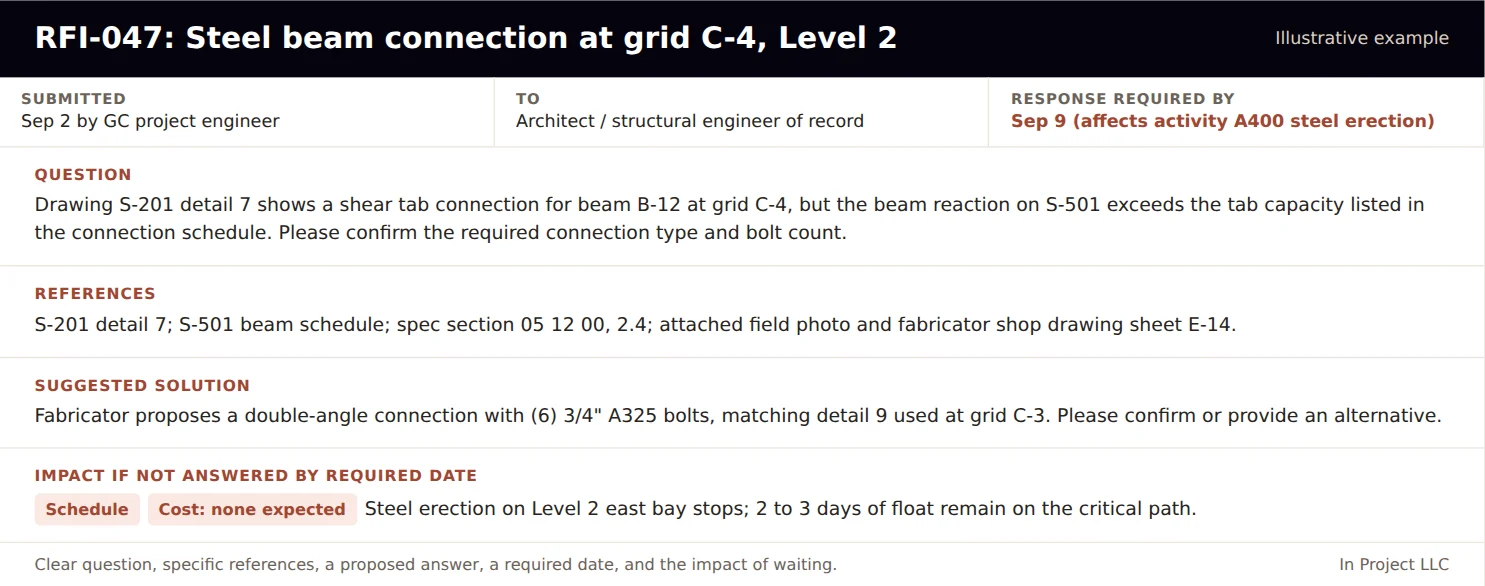
| Element | Why it matters |
|---|---|
| A specific subject line | Makes the RFI easy to find and discuss |
| One question per RFI | Prevents partial answers and confusion |
| Exact references | Drawing sheet and detail, specification section, grid line, room number |
| Photos or sketches | Show the actual condition the question is about |
| A suggested solution | Speeds the response and often leads to a quick confirmation |
| A required response date | Tied to the schedule activity the RFI affects |
| Impact if late | Cost or schedule consequence, stated plainly |
Common RFI mistakes
- Asking questions that are already answered in the documents, which erodes trust and slows real RFIs.
- Combining several unrelated questions in one RFI.
- Vague questions such as "Please clarify detail 7" with no description of the conflict.
- No required-by date, so every RFI looks equally urgent.
- Using RFIs to request changes without saying so. If the answer will change cost or time, say so and follow the change process.
- Letting answered RFIs sit unclosed in the log.
- Sending the RFI to the wrong party, which adds days before the right person even sees it.
A useful test before submitting: could someone unfamiliar with the project understand the question, find the location, and answer it from the RFI alone? If not, rewrite it.
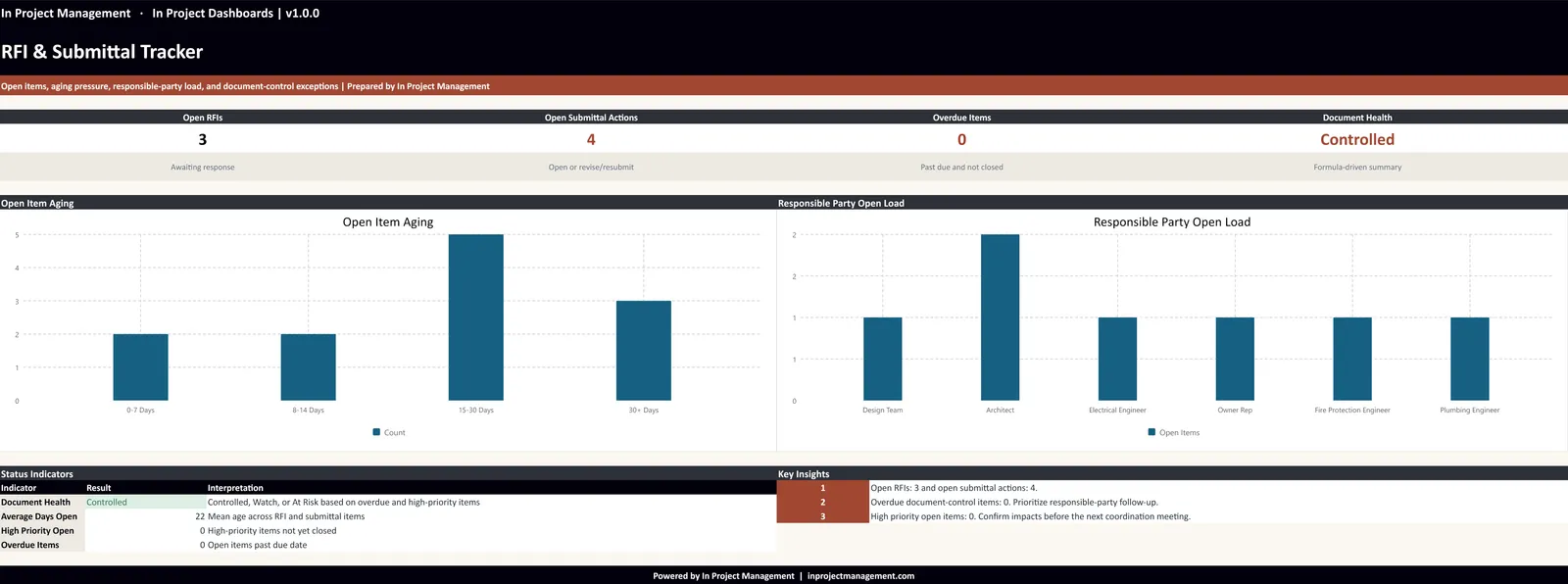
The RFI log: fields that matter
| Field | Purpose |
|---|---|
| RFI number and subject | Reference for meetings and correspondence |
| Discipline and location | Routes the RFI and helps spot patterns |
| Date submitted | Starts the response clock |
| Ball in court | Who owes the next action |
| Required-by date | Tied to the affected schedule activity |
| Affected activity and float | Shows schedule risk |
| Status | Open, answered, closed, or converted to a change |
| Days open | Aging for escalation |
| Cost or time impact | Flags RFIs that need a change order |
Response times and escalation
Most contracts set a response time for RFIs or require a reasonable time. Whatever the contract says, agree on a working target at kickoff and an escalation path for items that age.
| Situation | Target response | Escalation |
|---|---|---|
| Standard RFI | 7 to 10 working days, or per contract | Raise in weekly meeting if past due |
| RFI affecting a critical or near-critical activity | 2 to 5 working days | Direct call to the design lead; owner informed |
| Safety or life-safety question | Same or next day | Immediate escalation to owner and design team |
| RFI open more than 21 days | Already late | Executive escalation with schedule impact stated |
These targets are examples. Use the response times in your contract and agree on priorities with the owner and design team.
Tie every RFI to the schedule
The most useful RFI field is the required-by date linked to a specific schedule activity. When the log knows that RFI-047 affects steel erection and that activity has three days of float, the team can see that it is urgent even if it was submitted only a week ago. Without that link, a 30-day-old RFI on finish hardware and a 7-day-old RFI on structural steel look the same.
- When you write the RFI, identify the activity it affects in the schedule.
- Set the required-by date from the activity start minus any fabrication or procurement lead time.
- Review open RFIs against the three-week look-ahead every week.
- Escalate any RFI whose required-by date is inside the look-ahead window.
The RFI workflow, step by step
- Identify the question in the field or during coordination. Check all related drawings, specifications, and prior RFIs first.
- Draft the RFI with one question, exact references, photos, a suggested solution, the affected activity, and the required-by date.
- Review internally. The project manager or project engineer confirms the question is necessary and clearly written.
- Submit and log. Send through the agreed system and record it in the RFI log the same day.
- Track and follow up. Review open RFIs weekly against the look-ahead; escalate anything near its required date.
- Distribute the answer. Share it with the affected trades and update the field set of drawings.
- Close or convert. Close the RFI if no cost or time is involved; otherwise open a potential change order and reference the RFI.
Who does what
| Role | Responsibility |
|---|---|
| Subcontractor or trade foreman | Raises field questions early with photos and locations |
| Project engineer | Drafts, logs, and tracks RFIs; distributes answers |
| Project manager | Reviews RFIs before submission; escalates late items; manages cost and time impact |
| Superintendent | Identifies which RFIs block upcoming work in the look-ahead |
| Architect and engineers | Respond within agreed times; flag answers that change scope |
| Owner or owner's representative | Supports escalation and decisions that affect scope or budget |
How to reduce the number of RFIs
- Constructability reviews before bidding. Catch conflicts and gaps before contractors price them.
- Coordinated BIM models. Resolve clashes between structure, MEP, and architecture in the model.
- Pre-installation meetings. Walk through details with the trade before work starts.
- Read before you ask. Require project engineers to check all related sheets and specs before submitting.
- Track RFIs by cause and discipline. Patterns show where the documents need attention.
RFIs, submittals, and change orders: how they connect
RFIs rarely stand alone. An RFI answer can change a submittal that is already approved, which can change fabrication, which can create a cost or time impact. Treat the three logs as one system:
- Reference the RFI number on any submittal it affects, and mark the submittal for resubmittal if needed.
- When an RFI answer adds scope, open a potential change order the same day and reference the RFI. See our change order management guide.
- Review RFIs, submittals, and pending changes together in the weekly meeting, sorted by the schedule activity they affect.
Projects that connect the three logs see problems a week or two earlier, which is often the difference between recovering within float and losing time on the critical path.
RFI KPIs to track
| Metric | What it tells you |
|---|---|
| Open RFIs | Current workload and backlog |
| Average days to respond | Design team responsiveness |
| RFIs past required date | Immediate schedule risk |
| RFIs on critical or near-critical activities | Where to focus this week |
| RFIs that became change orders | Design completeness and cost exposure |
| RFIs by discipline | Where documents need improvement |
Using AI to manage RFIs
AI tools are well suited to RFI triage: reading the log, matching each open RFI to the look-ahead schedule, ranking items by schedule risk, and drafting follow-up messages. They can also help draft clearer RFIs by checking that the question, references, suggested solution, and impact are all present. In Project AI includes an RFI module that ranks open RFIs by response-time breaches and critical-path exposure for the project team to review. See our AI workflows guide for an RFI triage prompt you can use today.
How In Project helps
In Project LLC helps teams set up document control processes, RFI and submittal logs, and weekly reviews that keep design questions from turning into delays. Learn how RFIs fit into the wider controls system in What Are Project Controls in Construction?, or contact us for support.
Frequently asked questions
What does RFI mean in construction?
RFI stands for request for information: a formal written question, usually from the contractor to the design team or owner, asking for clarification of the drawings, specifications, or contract requirements.
How long should an RFI response take?
Follow the response time in your contract. Many projects target about 7 to 10 working days for standard RFIs and much faster for questions that affect critical-path work or safety.
What should be included in an RFI?
A clear subject, one specific question, exact drawing and specification references, photos or sketches, a suggested solution, a required response date tied to the schedule, and the cost or schedule impact if the answer is late.
What is the difference between an RFI and a change order?
An RFI asks for clarification of the existing contract documents. A change order is a signed agreement that changes scope, price, or time. If an RFI answer changes cost or time, it should move into the change order process.
How do you track RFIs on a construction project?
Use an RFI log with number, subject, discipline, date submitted, ball in court, required-by date, affected schedule activity, status, days open, and cost or time impact, and review it weekly against the look-ahead schedule.